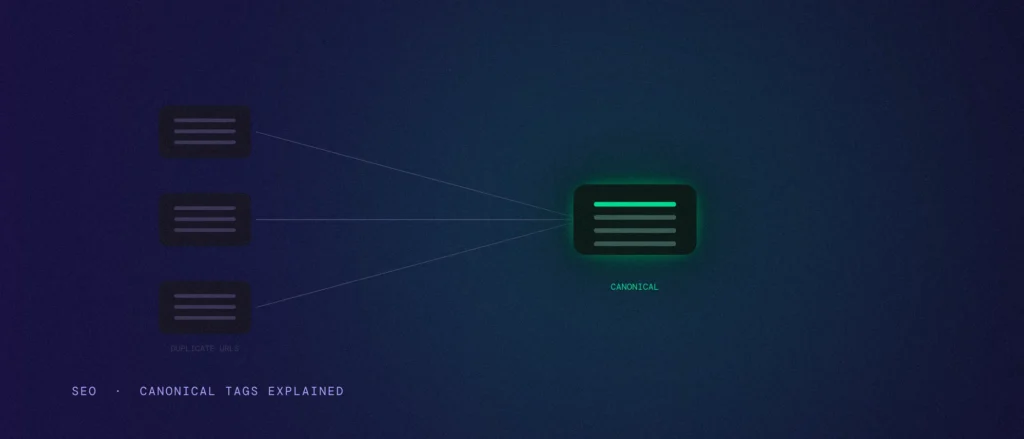
Most websites have duplicate pages without anyone deciding to create them. Duplicate content like this makes a search engine choose which URL to show. A product page reachable with three different URL parameters, the same blog post available with and without a trailing slash, a tracking link that adds a code to the end of an address. None of this is a mistake exactly. It is how websites work. The canonical tag is the small piece of code that tells Google which of those duplicates counts.
This guide explains what a canonical tag is, shows the code you need, and covers the mistakes that cost rankings, including what happens when a page has more than one canonical tag. We checked every point against Google’s own documentation on 2 October 2026.
Quick summary, if you’re short on time:
- A canonical tag is a line of code in a page’s head that says “this is the preferred version of this page, treat similar URLs as copies of it.”
- Google treats it as a strong signal, not a command. A redirect is also a strong signal, and a sitemap entry is only a weak one.
- Google says none of the methods are required. If you do not specify a canonical, it picks the version it thinks is best.
- The common mistakes are tags that point to the wrong page, contradict each other, or sit outside the head.
- Use Search Console’s URL Inspection tool to compare the canonical you declared with the one Google chose. When they differ, find out why.
Jump to a section:
- What a canonical tag is
- Canonical tag code: the examples you need
- Why your site has duplicate URLs
- A hint, not a command
- Canonical tag vs redirect vs sitemap
- The mistakes that quietly cost rankings
- How to check your own site
- Do canonical tags help SEO?
- What this looks like in practice
- Using AI to sort out your duplicate URLs
- Questions about canonical tags
What a canonical tag is
A canonical tag is a link element in a page’s HTML that points to the URL Google should treat as the main version. Google calls it the canonical element. It sits in the head section of the page, so a normal visitor never sees it.
The idea is simple. It is a hint to the search engine about your preferred URL. If three URLs show almost the same content, you pick one as the real one and tell Google, through the canonical tag on the other two, that they are copies. Instead of splitting links and other signals across three weak versions, they combine on the one you chose. Google describes this as consolidating signals for similar or duplicate pages.
Canonical tag code: the examples you need
The standard canonical code is one line in the head of the page. This is the example from Google’s documentation:
<link rel=”canonical” href=”https://example.com/dresses/green-dresses” />
Here is how to use it:
- On each duplicate page, put the tag in the head and point it at the page you want to be canonical.
- On the canonical page itself, add the same tag pointing at its own address. Google recommends this self-referential canonical.
- Use the full address. Google says to use absolute URLs, with https:// and the domain, not relative paths like /dresses/green-dresses. Relative paths are supported, but Google does not recommend them because they can cause problems later, for example if a test site gets crawled.
- Keep it in the head. Google says the canonical element is only accepted in the head of the page, so make sure the head is valid HTML.
For files that have no HTML, such as a PDF, you can use an HTTP header instead. The header looks like this:
Link: <https://www.example.com/downloads/white-paper.pdf>; rel=”canonical”
Google supports the header method for web search results only. It also says to choose one method, the HTML element or the header, because using both at once is more error prone.
If you use WordPress, Wix or Blogger, you may not be able to edit your HTML directly. Google notes that your CMS may have a search engine settings page or another way to set the canonical URL. Look in your SEO plugin first.
Why your site has duplicate URLs without you creating them
Nobody sits down and builds duplicate pages on purpose. They are a side effect of how the web works.
- A tracking link with a parameter on the end creates a new URL for the same page, and multiple versions of that link can end up in circulation.
- A filter or sort option on a category page often creates a new URL too.
- A site can be reachable with and without www, or with and without a trailing slash. To a browser these look the same, but to Google they are different addresses.
- Ecommerce sites are hit hardest, since one product may sit under several categories, plus filters. Service businesses are not immune: a print version of a page, a partner site that republishes your post, or a staging site that got indexed can all create the same problem.
A hint, not a command
Google’s guide to specifying a canonical URL lists the methods in order of how strongly they influence canonicalization:
- Redirects: a strong signal that the target of the redirect should become canonical.
- The rel=”canonical” element: a strong signal that the URL you specify should become canonical.
- Sitemap inclusion: a weak signal that helps the URLs in your sitemap become canonical.
Google says these methods can stack, so using two or more increases the chance that your preferred URL appears in search results. It also says that even when you name a canonical, Google may choose a different one because of content quality or technical signals. This often happens when your tag disagrees with another signal on your site, such as a redirect, a sitemap entry or a noindex setting.
The same guide points out that none of this is required. If you do not specify a canonical, Google will choose the version it considers best for users, and your site will likely do fine. A canonical tag helps most when you want to control which URL people see, consolidate signals, simplify tracking, or avoid wasting crawl time on duplicates.
This sits alongside other technical checks, such as whether Google’s mobile version of your page matches what you intended, and whether AI crawlers can reach your site. Each is a separate signal, but together they decide which version of your content Google trusts.
Canonical tag vs redirect vs sitemap
| Method | What it does | Use it when |
|---|---|---|
| 301 redirect | Sends visitors and Google from the old URL to the new one. A strong signal. | You are getting rid of a duplicate page for good |
| rel=”canonical” tag | Keeps both URLs live but names a preferred one. A strong signal. | Duplicates must stay accessible, such as filtered pages or tracking links |
| Sitemap entry | Lists the URLs you want treated as canonical. A weak signal. | Large sites, together with the other methods |
Google says to use redirects only when you are deprecating a duplicate page. If both versions need to stay live, use the canonical tag.
The mistakes that quietly cost rankings
Several canonical tags, or competing signals
Google’s best practices tell you not to specify different URLs as canonical for the same page using different techniques. For example, do not put one URL in your sitemap and a different one in the canonical tag. The same applies inside the page: a page with two canonical tags pointing to different URLs gives Google two answers, and Google’s documentation does not promise which one it will follow. So keep exactly one canonical tag per page.
A canonical that points somewhere broken
A tag pointing to a URL that redirects elsewhere, or to a page that returns an error, makes Google untangle the signal itself. Point the tag straight at the final, live URL. This is good practice, not a rule Google states in those words, but it removes the guesswork.
Using noindex or robots.txt for canonicalization
Google says not to use robots.txt for canonicalization, because it may still index URLs that are disallowed. It also does not recommend using noindex to pick a canonical within one site, because that completely blocks the page. Use the canonical tag or a redirect instead.
Paginated pages that all point to page 1
Google’s pagination guide says not to use the first page of a paginated sequence as the canonical page. Give each page its own canonical URL. Otherwise you ask Google to ignore pages 2, 3 and beyond.
A CMS or plugin that hardcodes the wrong URL
Google warns that some content management systems and plugins use canonicalization incorrectly and point to unwanted URLs. A template bug that puts the same canonical on every page tells Google that hundreds of different pages are copies of one. Check the HTML with your browser’s developer tools.
JavaScript that changes the canonical
If your site renders in the browser with JavaScript, Google says to put the canonical URL in the HTML source and make sure JavaScript does not change it. If you cannot set it in the source, leave it out and set it only with JavaScript, so the information is as clear as possible.
Pointing at a page that is not really a duplicate
A canonical tag only works when the pages are similar. Google says a duplicate must be similar to the canonical. Pointing the tag at a page with different content is not a shortcut for merging two pages, and Google is likely to ignore it. Also link to the canonical URL within your site, not to the duplicates, since consistent linking helps Google see your preference.
How to check your own site
- Look at one page. Open it, right-click, choose View Page Source and search for rel=”canonical”. Confirm the address is the one you want ranking.
- Use URL Inspection in Search Console. It shows two fields to compare: the user-declared canonical, which is what your page says, and the Google-selected canonical, which is what Google chose. When they differ, Google is telling you it did not agree with your signal.
- Open the Page indexing report. Look at the duplicate statuses below.
| Status in Search Console | What it means |
|---|---|
| Alternate page with proper canonical tag | The page points correctly to a canonical that is indexed. Nothing to do. |
| Duplicate without user-selected canonical | The page is a duplicate and names no preferred page. Google chose a canonical itself. Not an error, but review it if Google picked the wrong page. |
| Duplicate, Google chose different canonical than user | You marked this page as canonical, but Google thinks another URL is better and indexed that one instead. |
If Google picks a different canonical than you wanted, Google’s troubleshooting guide says the fix is to make sure clustered pages are sufficiently different, or fix technical problems. After a fix, Google may keep pages in a duplicate group for up to two weeks. You can use Request Indexing in URL Inspection for your most important URLs, but it has quotas.
Do canonical tags help SEO?
A canonical tag does not give a page a ranking boost. What it does is stop your signals from being split. Links to different versions of the same page add up on one URL, you choose which address shows in results, your reports show one set of numbers instead of several, and Google spends less crawl time on duplicates. That is why it matters for SEO, even though it is not a ranking factor on its own.
If duplicate or near-identical pages on your own site are competing with each other, our post on keyword cannibalisation covers the content side of the same problem.
What this looks like in practice
Picture an interior design firm in Bengaluru whose portfolio page lets visitors filter by room: kitchens, bedrooms, living rooms. Each filter click adds a parameter to the address, so the portfolio effectively exists at a dozen addresses with overlapping content.
Without canonical tags, Google might index several of these filtered URLs separately, splitting the value of what should be one strong portfolio page. With a canonical tag on every filtered version pointing at the plain portfolio URL, that value combines on the one page worth ranking.
If you would rather have this checked properly, ask us for a canonical and duplicate URL audit as part of a free site review.
Using AI to sort out your duplicate URLs
Once you have listed the URL variants a page really has, deciding which should be canonical is a structured job an AI tool can help with. Give it your real URLs, then check its answer against Google’s guide.
Act as a technical SEO helping me sort out canonical tags for a set of duplicate or near-duplicate URLs.
My URLs that show the same or very similar content:
– [URL 1]
– [URL 2]
– [URL 3]What I know about them:
– Which of these redirect elsewhere: [list, or none]
– Which are marked noindex: [list, or none]
– Which appear in my sitemap: [list]
– What canonical tag each one has now: [paste, or none]Please do the following:
1. Recommend which single URL should be canonical, and why.
2. Tell me what canonical tag each of the other URLs should have.
3. Point out any conflicts between the canonical tags, redirects, noindex and sitemap.Rules:
– Only use the facts I gave you. If something is missing, ask me instead of guessing.
– Use full absolute URLs.
– Keep it plain and short.
Check the answer against what URL Inspection shows for the same pages.
Questions about canonical tags
What is a canonical tag?
A canonical tag is a line of code in a page’s head that points to the preferred version of the page. It tells Google that similar or duplicate URLs should be treated as copies of that one. The code is a link element with rel=”canonical” and the preferred address in the href.
Is a canonical tag important for SEO?
It matters when duplicate or very similar pages exist. It lets links and other signals combine on one URL and lets you choose which address shows in search. Google says it is not required, and that it will pick a canonical itself if you do not. So it is helpful, not mandatory.
Can Google ignore a canonical tag?
Yes. Google treats the tag as a strong signal, not a command, and says it may choose a different canonical because of content quality or technical signals. The Search Console status “Duplicate, Google chose different canonical than user” shows when this has happened.
What happens if a page has multiple canonical tags?
Google’s documentation does not say which one it follows if they disagree, and it advises against giving different canonical signals for the same page. Keep one canonical tag per page, and make sure it matches your redirects and sitemap.
What is the difference between a canonical tag and a 301 redirect?
A redirect sends visitors and Google to the new URL, so the old one stops being used. A canonical tag keeps both URLs live and only names the preferred one. Use a redirect when you are removing a duplicate page, and a canonical tag when both need to stay.
Should every page have a canonical tag?
Google recommends adding a self-referential canonical to the canonical page itself, so it is good practice for pages you want indexed. It is not required. If you use WordPress or a similar CMS, your SEO plugin usually adds it for you, so check the page source to confirm it points where you expect.
Where this matters
Canonical tags are cheap insurance against duplicate URLs you do not even know exist. Add one clear tag per page, keep your redirects and sitemap consistent with it, and check URL Inspection when something looks off. The only real mistake is assuming the tag works without checking what Google chose.
Want a second pair of eyes on your duplicate pages? Our SEO service includes a check for canonical and duplicate URL issues as part of every audit.