Two pages on different sites say almost the same thing. They have similar headings, similar length and similar advice. One of them shows up as a supporting link in a Google AI Overview. The other never does. The owner of the second page wants to know what the first one did.
The honest starting point is that Google has not published a list of reasons why one page gets a link and a near-identical page does not. What it has published is a set of rules for who is eligible, how duplicate pages are handled, how AI answers fetch pages, and what kind of content it says matters most. This post lays those out, then gives you a short test you can run on your own pages. We read Google’s AI features page (last updated 10 December 2025), its AI optimization guide (10 July 2026) and its page on canonical URLs on 11 October 2026. Where something is our own reasoning, we say so.
Quick summary, if you’re short on time:
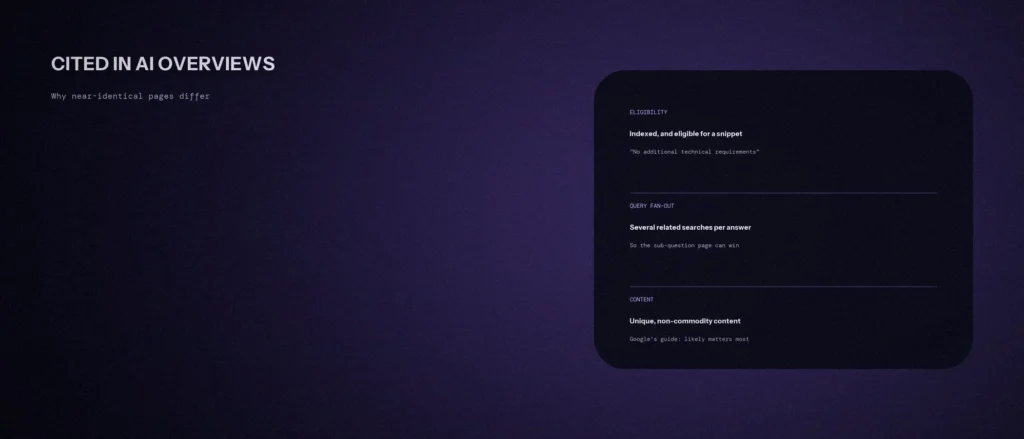
- Google says to be shown as a supporting link in AI Overviews or AI Mode, a page must be indexed and eligible to be shown in Google Search with a snippet. It says there are no additional technical requirements.
- When pages are duplicate or very similar, Google picks a canonical version to show. A near-identical page may simply not be the one it picks.
- Google says AI features may use “query fan-out”, issuing several related searches across subtopics, so the pages that appear depend on the sub-questions as well as the question you typed.
- Google says unique, non-commodity content will likely influence your presence in generative AI search more than any other suggestion in its guide.
- Google also says “AEO” and “GEO”, from its perspective, are still SEO. It names no special files or markup you need.
A note on words. People call a link inside an AI answer a citation, and the work of earning one “getting cited”. Google’s own term is a supporting link. In this post, an AI Overview citation means a supporting link to your page, and a cited source is a page that an AI answer links to. Third-party SEO tools, including Ahrefs and Semrush, may offer AI visibility reports on citations and brand mentions. We have not tested them, and Google says third-party tools have no access to its internal ranking data.
Jump to a section:
- The entry test: indexed, with a snippet
- Reason 1: only one near-identical page is the canonical
- Reason 2: the page that answers the sub-question
- Reason 3: commodity content versus a point of view
- Reason 4: controls that hide you on purpose
- What Google does not promise
- A seven-step test for your own pages
- A prompt to compare two pages
- Questions about being cited in AI Overviews
The entry test: indexed, with a snippet
Google’s page on AI features and your website says that to be eligible to be shown as a supporting link in AI Overviews or AI Mode, a page must be indexed and eligible to be shown in Google Search with a snippet, fulfilling the Search technical requirements. It adds: “There are no additional technical requirements.” It also warns that meeting every requirement does not mean Google will crawl, index or serve the content, because indexing and serving is not guaranteed.
That gives you the first two checks for a page that is missing. Is it indexed? And is it allowed to show a snippet? A page that fails either one has not lost a contest. It was never in it. In our own Search Console, four pages were listed as “discovered, currently not indexed” when we checked on 21 October 2026, which is a reminder that this check is not a formality.
Reason 1: only one near-identical page is the canonical
Google’s page on canonical URLs describes how you tell Google which of duplicate or very similar pages to treat as the main one. It lists the signals in order of strength: redirects and the rel="canonical" link are strong signals, and sitemap inclusion is a weak one. It also says that if you do not specify, Google will identify which version it judges to be objectively the best to show.
So when two pages say almost the same thing, only one needs to be chosen. This is our reasoning, and not something Google says about AI Overviews: if two of your own pages are near-identical, Google may choose one, and the other can drop out. If you do not care which one wins, you are letting Google pick. Our post on canonical tags explains how to say which page you prefer.
Reason 2: the page that answers the sub-question
Google’s AI features page says AI Overviews and AI Mode may use a “query fan-out” technique, issuing multiple related searches across subtopics and data sources to develop a response. The AI optimization guide gives an example: for the question “how to fix a lawn that’s full of weeds”, the fan-out queries might include “best herbicides for lawns”, “remove weeds without chemicals”, and “how to prevent weeds in lawn”.
The same guide says Google’s systems review the specific information from the retrieved pages. The practical point is ours: the page that gets a link may be the one that answered one sub-question well, not the one that matched your main phrase best. Two near-identical pages can differ here by a single paragraph. One has a clear answer to “how to prevent weeds”, and the other skips it.
Reason 3: commodity content versus a point of view
Google’s AI optimization guide says that creating content people find unique, compelling and useful will likely influence your website’s presence in generative AI search in the long run more than any of its other suggestions. It separates two kinds of content. Commodity content, its example is “7 Tips for First-Time Homebuyers”, is based on common knowledge that could originate from anyone and typically adds little unique insight. Non-commodity content provides unique expert or experienced takes beyond common knowledge.
The guide adds that its systems look at a variety of sources, so a unique viewpoint can stand out, and that a summary of existing content only restates information available elsewhere. Two near-identical pages are, by definition, the same commodity twice. If a page adds nothing the other one does not, there is no reason for it to be the one that is linked.
What a unique point of view means for a small business is something only you can supply: your own prices, your own process, a photo of the real work, the question customers ask, a number from your own records. Our post on 12 things to check for AI search covers the technical side. This is the content side.
Reason 4: controls that hide you on purpose
Google’s AI features page says that to limit the information shown from your pages in Search, you can use nosnippet, data-nosnippet, max-snippet or noindex. It also says a robots.txt directive for Googlebot is the control for how your site is crawled for Search. If a plugin, theme or page builder adds one of these to a page without you knowing, the page can be left out while a near-identical page without the tag is not. Google suggests testing with the URL Inspection tool, which shows the HTML Googlebot received.
What Google does not promise
- No ranking recipe for AI answers. Google says there are no additional requirements to appear in AI Overviews or AI Mode, nor other special optimizations.
- No special files or markup. It says you do not need to create new machine-readable files, AI text files or markup, and no special schema.org structured data.
- No need to rewrite for AI. The guide lists rewriting content just for AI systems among things you do not need to do, and says AI systems can understand synonyms and general meanings.
- No reward for inauthentic mentions. The guide cautions against seeking inauthentic mentions of your brand across the web.
Anyone who tells you they know the exact reason one page is cited and another is not is guessing. What you can do is check the documented causes in order.
A seven-step test for your own pages
- Is the page indexed? Use the URL Inspection tool in Search Console. If it is not, fix that first.
- Can it show a snippet? Look for
nosnippet,max-snippetornoindexin the source, including anything a plugin adds. - Which of your pages is the canonical? If you have two near-identical pages, decide which one you want, and point the other to it or make them different.
- List the sub-questions. Write the five related questions a person might ask around your topic. Does your page answer each one in its own clear paragraph?
- Find your unique content. Mark every sentence that only you could write. If there are fewer than five, add real details.
- Run the same prompt in the AI tools, and log it. Use the manual method in our post on checking whether ChatGPT mentions your brand. Note which pages are linked, and which competitors appear.
- Re-check in a month. Results change, so a single check is a snapshot and not a verdict.
A prompt to compare two pages
An AI tool can compare two pieces of text well. It cannot see how Google judges them, so use it to find content differences only.
Act as a careful editor. Compare two web pages on the same topic and tell me what content one has that the other lacks. Use only the text I paste.
My details:
– The topic and the question a customer would ask: [for example “how much does a root canal cost in Bangalore”]
– Page A, the one that is cited in AI answers, as plain text: [paste]
– Page B, mine, which is not cited, as plain text: [paste]Please do the following:
1. List five sub-questions a reader might ask around this topic. For each one, say whether A answers it, B answers it, both do or neither does.
2. List the sentences in each page that contain a unique fact, number, example or first-hand detail. Count them.
3. Quote any paragraph in A that answers a question clearly in two or three sentences and has no equivalent in B.
4. List five specific things I could add to B, using only facts I could supply from my own business, and say what I would need to provide.
5. Say what you cannot know from the text, such as indexing, links and how Google ranks either page.Rules:
– Use only the pasted text. Do not guess why Google chose either page.
– Do not invent facts about my business.
– Say clearly when something is your opinion.
– Write in plain, simple English.
Add only what is true, and check each fact before you publish it.
Questions about being cited in AI Overviews
How do I get my page cited in Google AI Overviews?
Google says a page must be indexed and eligible to show a snippet, and that there are no additional technical requirements or special optimizations. Its guide says unique, non-commodity content will likely matter most over time.
Why is a copy of my page cited and mine is not?
Google has not published reasons for individual cases. Check the documented causes: indexing, snippet controls, which duplicate is canonical, whether your page answers the sub-questions, and whether it adds anything unique.
Do I need special schema or an llms.txt file for AI Overviews?
No. Google says you do not need new machine-readable files, AI text files or markup, and no special schema.org structured data, to appear in these features.
Is GEO different from SEO?
From Google Search’s perspective, no. Its guide says optimizing for generative AI search is optimizing for the search experience, so it is still SEO. It suggests reviewing its guidance on evaluating third-party SEO advice if you are offered GEO services.
What is query fan-out?
Google says AI Overviews and AI Mode may issue multiple related searches across subtopics and data sources to build an answer. A page can be linked because it answers one of those related questions well.
Can I stop my pages appearing in AI features?
Google says to limit the information shown from your pages, use nosnippet, data-nosnippet, max-snippet or noindex. Test the change with the URL Inspection tool, and allow time for Google to recrawl.
How do I see AI Overview traffic in Search Console?
Google says sites appearing in AI features are included in overall search traffic and reported in the Performance report, within the Web search type. Search Console also has a separate generative AI report, which our post on Search Console’s AI performance reports explains.
Where this matters
If a near-identical page is cited and yours is not, start with the dull checks: indexing, snippet controls and which duplicate is the canonical. Then look at what your page says that nobody else’s does. Google names that as the factor most likely to matter over time.
If you would like us to check one of your pages against these seven steps, send us the address and we will tell you what we see.