Most meta descriptions are written once, in a hurry, and never looked at again. Then Google shows something else anyway. So is it worth writing them at all?
Yes, but for a narrower reason than most guides claim. Good meta descriptions won’t lift your rankings. What they can do is earn the click from people who already found you. This post covers what Google says about meta descriptions, what a real study found about how often they’re replaced, and how to write ones that get read.
Quick summary, if you’re short on time:
- Google says it “sometimes” uses your meta description, and only when it gives users a more accurate description of the page.
- Google says there’s no length limit, but the snippet is cut off as needed.
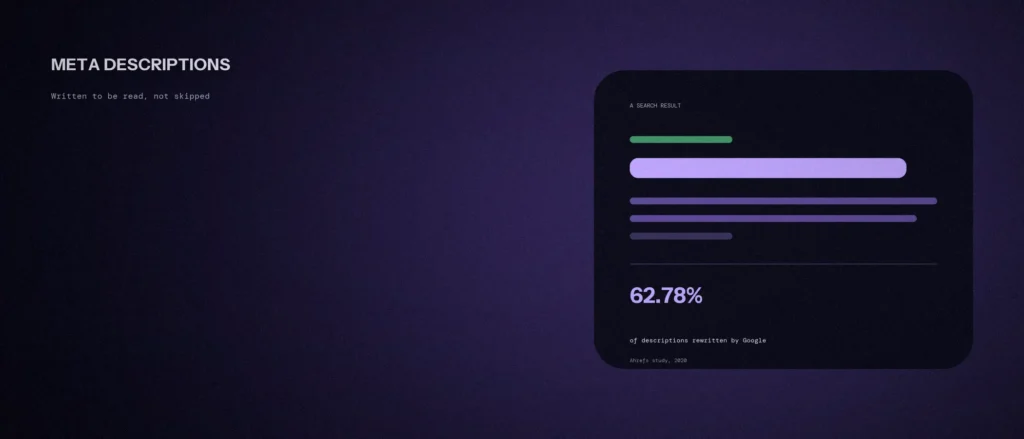
- A 2020 Ahrefs study found Google showed a different snippet from the written meta description in 62.78% of the results it checked.
- Google warns that long strings of keywords are “less likely to be displayed as a snippet.”
- Write one clear, honest description per page, and lead with the part a searcher cares about most.
Jump to a section:
- What Google says about meta descriptions
- How often Google rewrites them
- So why still write them
- How to write one that gets read
- What to avoid
- A prompt for writing your own
- Questions worth answering directly
What Google says about meta descriptions
Google’s documentation on snippets and meta descriptions is clear on a few points.
- It’s not guaranteed. Google says it “sometimes uses” the meta description tag, when the tag “might give users a more accurate description” of the page than text taken from the page itself.
- The snippet changes with the search. Google says snippets are designed to preview the content that best relates to a user’s specific search, and that Google Search “might show different snippets for different searches.”
- Important pages should have their own. Google says identical or similar descriptions on every page “aren’t helpful,” and to create descriptions that describe the specific page “wherever possible.” If you don’t have time for every page, it says to at least cover critical URLs like your home page and popular pages.
- Length is flexible. Google says there’s no limit on how long a meta description can be, but the snippet is truncated in results as needed.
Google’s page on supported meta tags puts the tag’s job simply: it provides “a short description of the page,” and “in some situations” that description is used in the snippet. Nothing on either page says the tag is used to rank your page higher.
How often Google rewrites them
Ahrefs measured this in a study of meta description rewrites. It compared the written descriptions with the snippets Google actually showed for 20,000 keywords. Its headline result: Google showed a different snippet from the written description in 62.78% of them. Ahrefs calls this a rewrite, and I use that word as shorthand from here on.
A few other details from the same study:
- Descriptions were rewritten 59.65% of the time for fat-head keywords (the very high-volume ones) and 65.62% of the time for long-tail ones.
- Too-long descriptions were rewritten 61.46% of the time. The others were rewritten 63.69% of the time. So being short didn’t protect a description.
- About 25% of the top-ranking pages had no meta description at all.
Two cautions. First, this study is from October 2020, and Google’s snippets have changed since, so treat the exact percentages as a rough guide. Second, Ahrefs notes it couldn’t sort keywords into high and low volume with full certainty.
So why still write them
If Google rewrites most descriptions, it’s fair to ask if the work is wasted. Here is why I’d still do it, at least for your important pages.
- Some of the time, yours will be used. The Ahrefs figures also mean about 37% of descriptions were shown as written. For a page you care about, that’s worth a few minutes.
- It gives Google a good option. Google uses your description when it describes the page better than the page text does. A clear one gives it that choice.
- It’s a small lever on clicks. The description isn’t a ranking factor, as far as Google’s documents say, but it sits under your title in the result. Google says high-quality descriptions “can go a long way to improving the quality and quantity of your search traffic.” Our post on title tags that earn clicks covers the other half of that space.
- It can help outside Google. Ahrefs points out that many social platforms may use the meta description as a fallback preview when a page has no other preview tags. How this looks differs from one platform to the next.
Ahrefs’ advice is to start with pages that already get organic traffic. I agree. Don’t spend a week on every page. Do the pages that matter first.
How to write one that gets read
Google’s own guidance is to describe the specific page accurately. Here’s how to do that in a way people actually read.
- Start with what the page is for. Say what the reader will get in the first few words. If the description gets cut off, the important part should already have been read.
- Answer the search, not the page title. The searcher already saw your title. Use the description to add something new, like a detail, a price range, a time frame or who the page is for.
- Use plain words. Write the way you’d explain the page to a customer across a table.
- Include one real reason to click. A free audit, a fixed price or a clear next step is better than a slogan.
- Keep it to one or two short sentences. Google has no length limit, but long descriptions get cut. About 150 to 160 characters is a sensible target on desktop. That’s my rule of thumb, not a Google rule.
- Make each important one different. Google says identical or similar descriptions on every page aren’t helpful. Copying one description across many pages gives Google little reason to use it.
Here is a real example. Our homepage description now reads: “Zunelo Digital is an AI-first digital marketing agency in Bangalore for SEO, Local SEO, Google Ads, websites and AI search visibility. Free audit in 48 hours.” It says who we are, where we work, what we do, and gives one reason to act.
What to avoid
- Keyword lists. Google says descriptions made of long strings of keywords “don’t give users a clear idea of the page’s content, and are less likely to be displayed as a snippet.” Our post on how much keyword repetition is too much covers the same trap on the page itself.
- Vague promises. “The best solutions for your business” says nothing. Say what the page actually offers.
- Claims the page doesn’t back up. If the description promises something the page doesn’t deliver, people leave quickly.
- Leaving it blank on a page that matters. Google will pick text from the page instead, and it may not be the best choice.
A prompt for writing your own
An AI tool can give you a first draft of a meta description in seconds. But it only writes something useful if you tell it what the page really offers and who it is for. The prompt below asks for that. Paste in your own page details, run it in ChatGPT, Claude or whichever tool you use, then read the results and fix anything that is not true.
Act as an SEO copywriter. I need meta descriptions for one page on my website.
Here is the page:
– Page address: [paste the URL]
– What the page is about, in one sentence: [describe it]
– Who it is for: [describe the reader]
– The search someone would type to find it: [the main keyword]
– One real reason to click: [for example a free audit, a fixed price, or a clear next step]Write 3 different meta descriptions for this page.
Rules:
– Keep each one under 160 characters.
– Put the most useful part in the first 70 characters.
– Use plain words, like you are explaining the page to a customer.
– Use the keyword once, only if it reads naturally. Do not stuff keywords.
– Only say things the page really delivers. Do not invent prices, results or claims.
– Do not start with the business name unless it is the homepage.After the 3 options, tell me which one you would pick and why, in one sentence.
Check each option against the page before you use it. If a description promises something the page does not show, cut it. Then set the one you pick in your SEO plugin. After Google has recrawled the page, compare its click-through rate in Search Console with a similar earlier period, and keep its average position in view. Google may still show a different snippet, and rankings or seasons can move clicks too, so treat a change as a clue, not proof.
Questions worth answering directly
Is the meta description a ranking factor?
Google’s documentation on the tag says it provides a short description of the page and may be used in the snippet. It doesn’t say the tag helps a page rank higher. Treat it as a way to earn clicks, not rankings.
How long should a meta description be?
Google says there’s no length limit, but the snippet is cut off as needed. Putting the key point first matters more than the exact character count. About 150 to 160 characters is a common target, though that’s a habit, not a Google rule.
Why does Google show a different description from the one I wrote?
Google says snippets are designed to show the content that best relates to a specific search, so the text can change from one search to another. In Ahrefs’ 2020 study, Google showed a different snippet from the written description in 62.78% of the results it checked.
Should every page have its own meta description?
Google recommends a site-level description on the homepage and page-level descriptions everywhere else, wherever possible. If you don’t have time for every page, it says to at least cover critical URLs like your home page and popular pages. Start with your service pages and best-performing posts.
Should I put my keyword in the meta description?
Use it naturally if it fits, since it tells the searcher the page is relevant. Don’t stuff keywords in. Google says long strings of keywords are less likely to be shown as a snippet.
What happens if I leave the meta description empty?
Google will pick text from the page to build the snippet. That works, but it may not be the text you’d choose. Ahrefs found that about 25% of top-ranking pages had no meta description at all, so it’s common, but a good one gives you more control.
Where this actually matters
A meta description is a small, cheap thing to get right. It won’t save a weak page. But when Google does show it, a clear description gives the searcher a better reason to choose your result. Start with the pages that bring in visitors today.
Not sure which of your pages need better titles and descriptions first? Our SEO services start with an audit that shows you the highest-priority fixes.