Ask a business owner what customers search for and they’ll give you a keyword: “SEO agency Bangalore.” Ask a customer what they typed into an AI assistant and you’ll get something else entirely: “I run a small clinic in Bangalore, I have no website traffic, and I don’t want to sign a long contract. What should I do first?”
That second kind of question is the one AI assistants are answering now. Here’s what the evidence says about how it differs from a Google search, and a simple way to map the questions your own buyers actually ask.
Quick summary, if you’re short on time:
- A 2023 randomized experiment by Xu, Feng and Chen found ChatGPT users wrote significantly longer queries than Google users on all three tasks.
- The same study found ChatGPT users finished tasks faster, and performance was similar on two of the three tasks.
- Google says AI Overviews and AI Mode may use “query fan-out,” issuing multiple related searches across subtopics to build one answer.
- Google also says there are “no additional requirements” to appear in these features beyond normal Search eligibility.
- So the work is not a trick. It’s knowing the real questions, then answering them clearly on pages Google can already index.
Jump to a section:
- How AI questions differ from searches
- Why one question becomes many searches
- Where your buyers’ real questions already live
- How to map them to pages
- A prompt to find the questions your buyers ask
- Questions worth answering directly
How AI questions differ from searches
The clearest evidence is a 2023 randomized experiment comparing a ChatGPT-style tool with a Google Search tool. It had 95 participants in the final sample, 48 using ChatGPT and 47 using Google. The authors report that “ChatGPT users tend to formulate significantly longer queries in search tasks compared to Google Search users,” and that this held across all three tasks.
Two honest caveats. It’s a small study from 2023, run with simulated tools, so treat it as a direction, not a precise number. And we’ve left out the widely quoted “17 times longer” style statistics, because we couldn’t trace them to a method we could check.
The direction still matters. People talk to an assistant. They add their situation, their budget and their worries, which a two-word keyword never carries. This is the same shift we covered in our post on follow-up queries.
Why one question becomes many searches
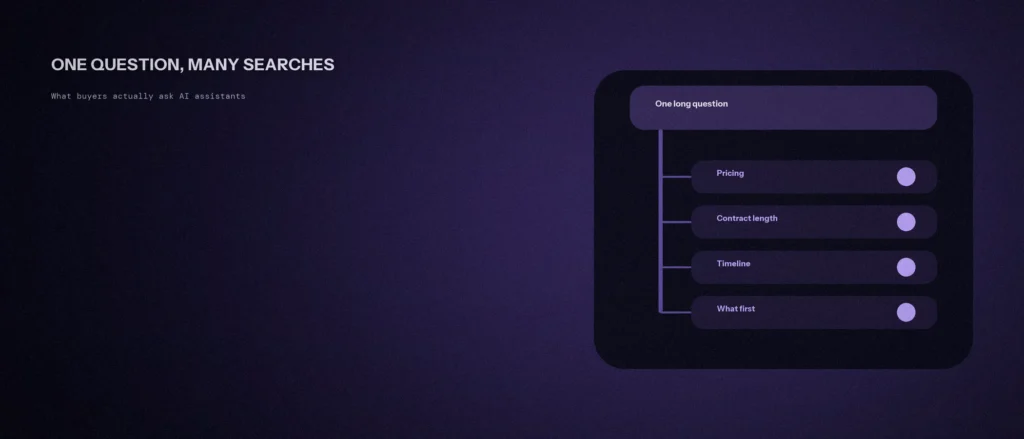
A long question isn’t answered with one lookup. Google’s documentation on AI features says both AI Overviews and AI Mode “may use a ‘query fan-out’ technique, issuing multiple related searches across subtopics and data sources” to build a response and find supporting pages.
In practice, one buyer question about a clinic’s first steps could trigger separate lookups on pricing, contract length, timelines and what to fix first. Your page can be pulled in for any one of those sub-questions, even if it never matched the whole long question.
Google is also direct that there’s no special trick here: “There are no additional requirements to appear in AI Overviews or AI Mode, nor other special optimizations necessary.” A page must be indexed and eligible to show with a snippet. That’s the same bar as normal search.
Where your buyers’ real questions already live
You don’t need a paid tool to find them. Most are already sitting in places you can check today:
- Sales calls and emails. The exact words a prospect used to describe their problem. Copy them down unedited.
- Google Search Console. Filter queries to those with five or more words. These are the closest thing to conversational questions you already rank for.
- Search suggestions. Type the start of a question and note what Google completes, plus the “People also ask” box.
- Your own AI assistant. Ask it the question a customer would and read the sub-topics it covers in the answer.
Treat these as directional. They show what people ask, not how often. Volume tools can help later, but the wording from real conversations is the part no keyword report gives you.
How to map them to pages
Put the questions in a simple sheet with three columns: the question in the buyer’s own words, the sub-questions hiding inside it, and the page that answers each one. Then look for gaps.
Where a page exists, check that it answers the question in the first couple of sentences under a clear heading, rather than burying it. Where nothing exists, that’s your next post or FAQ entry. Questions that are about who you are and whether you can be trusted belong on your own pages too, which connects to the wider picture in our post on the three pillars of GEO.
Write each answer the way you’d say it to the person across the table: plain words, a real number where you have one, and a straight answer to the question asked.
A prompt to find the questions your buyers ask
The questions your customers ask AI tools are close to the questions they ask you. The prompt below helps you list them. Fill in your details, then check the list against real conversations.
Act as a customer research assistant. Help me list the questions my buyers ask before they choose a business like mine.
My business:
– What I sell and where: [describe]
– My typical customer: [describe]
– Real questions I hear on calls or messages: [list a few]Please do the following:
1. List 20 likely questions, grouped by stage: just looking, comparing, ready to buy.
2. Mark the 5 I should answer first on my website.
3. Give a plain two-sentence answer outline for each of those 5, using only facts I give you.Rules:
– Do not invent facts about my business or prices.
– Use the words customers would use, not industry terms.
Add real questions from your own inbox to the list, and answer the five most common ones on a page this month.
Questions worth answering directly
Do people really ask AI assistants different questions than they type into Google?
The evidence points that way. A 2023 randomized experiment with 95 participants found ChatGPT users wrote significantly longer queries than Google users on all three tasks. It’s a small study, so treat it as a direction, not an exact figure.
Do I need special optimization to appear in AI Overviews?
Google says no. Its documentation states there are no additional requirements to appear in AI Overviews or AI Mode, nor other special optimizations necessary. Your pages need to be indexed and eligible to appear in Search with a snippet.
Where can I find the questions my buyers ask for free?
Start with sales calls and emails, then filter Google Search Console for longer queries, check search suggestions and People also ask, and ask an AI assistant the question yourself. These show what people ask, though not how often.
What is query fan-out?
It’s a technique Google says AI Overviews and AI Mode may use: issuing multiple related searches across subtopics and data sources to build one answer and find supporting pages. One long buyer question can trigger several separate lookups.
Can I use an AI assistant to find my buyers’ questions?
It’s a useful check, not a source of truth. Ask the question a customer would ask and note the subtopics the answer covers. Then compare with real questions from sales calls, emails and Search Console.
Do I need a separate page for every question?
No. First check whether an existing page answers it in the first couple of sentences under a clear heading. Where nothing exists, a new post or an FAQ entry is the next step.
Where this actually matters
Buyers now describe their whole situation before they ever visit a site. The businesses that get picked are the ones whose pages already answer that situation in plain words, and you can only write those answers once you know the real questions.
Not sure which questions your own buyers are asking, or whether your pages answer them? We work through this as part of every AI SEO and GEO engagement we run.