Images are usually the heaviest thing on a web page. A beautiful hero photo that weighs 3 MB can make a phone wait for several seconds, and a visitor on a weak connection leaves before they read your first line. Fixing images is also one of the few speed jobs you can do without a developer: choose a good format, send the right size, load only what is needed, and describe each image in words.
This post explains image optimization for a website in the order you would do it: formats, sizes, lazy loading, layout space and alt text. We read Google Search Central’s image guidance and web.dev’s pages on formats, lazy loading and Largest Contentful Paint on 11 October 2026, and we checked the images on our own site. Where a point is our own advice, we say so. If you want the wider speed picture first, our post on website speed fixes you can make without a developer comes first.
Quick summary, if you’re short on time:
- Google Search supports BMP, GIF, JPEG, PNG, WebP, SVG and AVIF in the
srcof animgelement. It does not index CSS images. - web.dev says WebP and AVIF offer higher quality at far smaller file sizes than older formats, but JPEG, PNG and GIF are the only ones guaranteed in every browser.
- Use
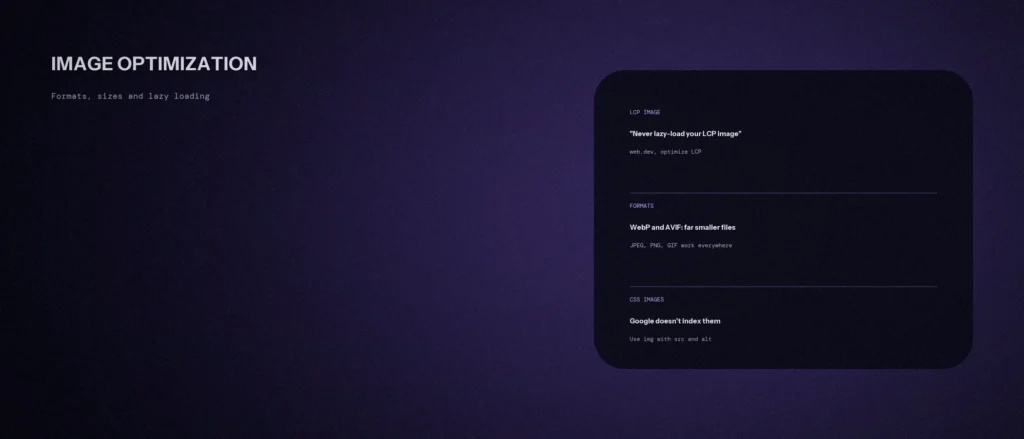
loading="lazy"only for images outside the first screen. web.dev warns: never lazy-load your Largest Contentful Paint (LCP) image. - Put
widthandheighton every image, so the page does not jump while it loads. - Google says alt text is the most important piece of image metadata, and it helps people who use screen readers.
In short: resize images to the space they fill, compress them, and choose the right format. Large images are the usual cause of a slow load time, so these steps are the best practices for improving loading speed and page speed. Lossless compression keeps every pixel but saves less, while lossy compression saves more and can lower image quality, so look at the result before you publish. A search engine can only index an image it can find, which is why the HTML rules below matter.
Jump to a section:
- Why images matter for speed
- Choosing a format
- Sending the right size
- Lazy loading, and what never to lazy-load
- Stopping the page from jumping
- Alt text, file names and what Google can find
- What we found on our own site
- A prompt to plan your image fixes
- Questions about image optimization
Why images matter for speed
web.dev, citing the HTTP Archive, says images are the most-requested asset type for most websites and usually take more bandwidth than any other resource. At the 90th percentile, it says, sites send over 5 MB of images on desktop and mobile. Google’s own image guidance says images are often the largest contributor to overall page size, which can make pages slow and expensive to load, and that sharp images also look better in search result thumbnails. So the target is both: sharp, and light.
Images are also usually the biggest thing on the first screen. web.dev says to aim for an LCP of 2.5 seconds or less for at least 75% of page visits, and a hero image is often the element being measured. That makes the hero image the one to get right first.
Choosing a format
Google’s image guidance says Google Search supports images in the src attribute of img in these formats: BMP, GIF, JPEG, PNG, WebP, SVG and AVIF. So Google has no problem with the newer formats. The decision is about file size and browser support.
web.dev’s page on the AVIF format says AVIF and WebP can offer higher quality and far smaller file sizes than older formats. It also gives the catch: support for GIF, PNG and JPEG is guaranteed across all browsers, WebP support is excellent across modern browsers but is not a given across the entire web, and AVIF is newer still (Chrome and Opera since 2020, Firefox in 2021 and Safari in 2022).
| What the image is | Format we would choose | Why |
|---|---|---|
| A photo or a hero banner | WebP, or AVIF with a fallback | Smaller than JPEG for the same look, per web.dev |
| A logo or a simple icon | SVG | Google supports it, and it stays sharp at any size |
| A screenshot with small text | PNG or WebP | Our opinion: check the text stays readable after compression |
| An old image you cannot replace | JPEG or PNG | Works everywhere |
If you want AVIF for the saving and JPEG for safety, Google’s page shows the pattern: a picture element with a source for the newer format and an img fallback inside it. The browser picks the first format it understands.
Sending the right size
A phone screen is a few hundred pixels wide. If you send a 2,100 pixel image, the phone downloads pixels it throws away. web.dev’s page on descriptive image syntaxes explains that srcset gives the browser a choice of image files, and the browser makes the best decision for the viewport size, screen density and other conditions. It is not a way of swapping an image at a breakpoint. You supply two or three widths, and the browser chooses.
A practical way to work:
- Find the widest your image is ever shown on your site, in pixels.
- Export it at that width, and at half that width for phones.
- Add both to
srcset, and let WordPress or your theme do it if it can. WordPress creates several sizes of each upload by default. - Compress the result. Look at it at the size it will be shown, not zoomed in.
Lazy loading, and what never to lazy-load
Lazy loading means waiting to load an image until it is close to the screen. web.dev’s page on browser-level image lazy loading says you can use the loading attribute for this, without any extra code. It also gives the rule that matters most: always load images that are visible in the first viewport the normal way, and use loading="lazy" only for images outside the initial viewport.
web.dev’s page on optimizing LCP goes further. It says that setting loading="lazy" on your LCP image delays it, and its warning is plain: never lazy-load your LCP image, because that always leads to unnecessary resource load delay and hurts LCP. For the one image that matters most, it shows how to preload it with a high fetch priority.
Google’s page on fixing lazy-loaded content adds the search side. Lazy loading must load all relevant content whenever it is visible in the viewport, without a click or scroll, because Google Search does not interact with your page. It lists browser built-in lazy loading, the IntersectionObserver API and JavaScript libraries that load on viewport entry as methods that work. It also says not to lazy-load content that is likely to be visible immediately.
Stopping the page from jumping
When a browser starts loading an image, it does not know how big it will be unless you say so. The text then jumps down when the picture arrives. web.dev’s page on optimizing layout shift says to always include width and height attributes on image and video elements, or to reserve the space with the CSS aspect-ratio property, so the browser can set aside the right amount of room. The Core Web Vitals target for layout shift is 0.1 or less.
Alt text, file names and what Google can find
- Use real image tags. Google can find images in the
srcof animgelement, even when it sits inside apicture. It says it does not index CSS images, so a photo set as a background cannot be found as an image. - Write alt text. Google calls alt text the most important attribute for giving an image more metadata. It also improves accessibility for people who use screen readers or have low-bandwidth connections.
- Use a descriptive file name. Google says the file name can give light clues about what the image shows. “root-canal-treatment-clinic.webp” says more than “IMG_4821.webp”.
- Put the image near related text. Google extracts information about an image from the content of the page, including captions and titles.
What we found on our own site
We checked six pages on zunelo.in on 11 October 2026, using the page source and the file sizes the server reports.
| Check | What we found |
|---|---|
| Formats | Hero images are WebP, about 37 to 42 KB each, at up to 2,100 pixels wide. Logos are SVG |
| Width and height | Every image we checked has both attributes |
| Alt text | Present on every image except one small 56 pixel image with an empty alt. That is correct only if it is purely decorative, so we will check it |
| First image on a blog post | Loads straight away, with high fetch priority, and has srcset |
| Lower images on a blog post | Lazy-loaded by a caching plugin, which swaps the real address into data-src until the image is near the screen |
| Hero on a service page | Loads normally, but one size for every screen and no fetch priority set. A gap we can still close |
The hero images are already small. The open item is that the service page hero is the same 2,100 pixel file for a phone and a desktop, and it does not say it is high priority. The lower-page images use a lazy-load plugin that does what Google’s page describes, loading when they enter the view, but we would test it with the URL Inspection tool in Search Console before relying on it for image search.
A prompt to plan your image fixes
An AI tool can sort an image list into actions. It cannot see your pages, so give it the facts from your own site.
Act as a careful web performance adviser. Help me plan image fixes for one page, using only the list I give you.
My details:
– The page and what it sells: [for example “home page of a dental clinic in Indiranagar”]
– For each image: file name, format, pixel size, file size in KB, whether it is on the first screen on a phone, and its current alt text: [paste a table]
– My Largest Contentful Paint element, if I know it: [for example “the hero photo”]Please do the following:
1. Mark the image most likely to be the LCP image, and say if it should NOT be lazy-loaded.
2. For each image, say: keep format or change, target width in pixels for phone and desktop, and lazy or normal loading.
3. Flag any image over 150 KB and any that is much wider than the space it fills.
4. Rewrite weak alt text in one plain sentence each, describing the image.
5. List what you cannot judge without seeing the page.Rules:
– Use only my list. Do not invent file sizes, dimensions or results.
– Never suggest lazy-loading an image on the first screen.
– Say clearly when something is your opinion.
– Write in plain, simple English.
Run PageSpeed Insights on the page before and after, and compare the LCP number.
Questions about image optimization
What is the best image format for a website?
For photos, WebP or AVIF give smaller files than JPEG, per web.dev, but JPEG, PNG and GIF are the only ones guaranteed everywhere. For logos and icons, SVG stays sharp at any size. Google Search supports all of them.
Does image size affect SEO?
Indirectly. Google says images are often the largest part of a page’s weight, which can make pages slow and expensive to load, and speed affects the experience of your visitors. Google also asks for sharp images, because they look better in search thumbnails.
Should I lazy-load every image?
No. Use lazy loading only for images outside the first screen. web.dev warns never to lazy-load your LCP image, because it delays the image that matters most.
Does Google index images set as CSS backgrounds?
No. Google says it does not index CSS images. Use an img element with a src and alt text for any image you want found.
Why add width and height to images?
So the browser can reserve space before the image loads, and the page does not jump. web.dev recommends width and height attributes on every image, or the CSS aspect-ratio property.
What should I write in alt text?
One plain sentence that says what the image shows, as if you were describing it to someone on the phone. Google calls alt text the most important image attribute, and it helps people who use screen readers.
How big should a hero image file be?
Neither Google nor web.dev gives one number. As a working target, our own hero images are about 40 KB each in WebP, at up to 2,100 pixels wide. Compare the result against your page’s LCP time, which is what matters.
Where this matters
Images are the easiest speed win on most small business sites. Choose WebP for photos and SVG for logos, send the size the screen needs, lazy-load only what is off the first screen, give every image width and height, and write a plain sentence of alt text.
If you would like us to check the images on your own site, send us the address and we will tell you what we see.