A business owner checks Google Ads and sees zero call conversions this month. The phone rang plenty of times, staff took real enquiries, but none of it shows up. The first thought is that the ads aren’t working. Often the calls happened, and Google Ads never counted them.
This post explains how call tracking for Google Ads works, the five ways Google lets you track phone calls, how to set up website call tracking, and the silent gaps that make real calls disappear. We checked every step against Google’s own Ads Help pages on 2 October 2026.
Quick summary, if you’re short on time:
- Google Ads can track phone calls in five ways. Each one measures something different, and one of them counts clicks on a number, not calls.
- For calls from ads and calls to a number on your website, a call counts as a conversion only if it lasts at least the minimum length you set.
- Calls only count if they come through the Google forwarding number. A different number printed on a flyer or listed on your profile is invisible to Google Ads.
- Caller phone numbers show for calls over 15 seconds, except in India, so you cannot always follow up from the call log.
- Compare the calls Google Ads reports with your own phone records before you trust the numbers.
Jump to a section:
- How call tracking in Google Ads works
- The five ways to track phone calls
- How to set up website call tracking
- Why real calls still go missing
- How to check that it works
- What call tracking costs
- A prompt to find missed phone conversions
- Questions about call tracking
How call tracking in Google Ads works
Google Ads tracks calls by swapping your real business number for a Google forwarding number. When a customer clicks your ad and calls that number, the call is routed to your business, and Google records details such as the call length and start time.
For ads that show a call button, this is called call reporting. Google says that when it is on, a forwarding number is assigned to your ad, and you can see the call duration, the start time, the caller’s phone number for calls over 15 seconds (except in India), and whether the call was connected. You can turn call reporting off if you want to show your own number or use third-party call tracking. Then Google Ads cannot track those calls as conversions.
You choose how long a call must last before it counts. That choice is the source of many silent gaps, as the sections below show.
The five ways to track phone calls
Google’s page on phone call conversion tracking lists five ways. They are not the same, so pick the one that matches how your customers call.
| Type | What it tracks | Things to know |
|---|---|---|
| Calls from ads | Calls made directly from call ads, or call and location assets in your ads | You set a minimum call length. Call reporting must be on, which uses Google forwarding numbers. |
| Calls to a number on your website | A call after someone clicks your ad, then calls the forwarding number shown on your site | You set a minimum call length. Needs the Google tag and a website call event snippet. |
| Clicks on a number on your mobile website | Taps on a phone number, button or link on the mobile site | Google can only track the clicks, not the calls themselves. |
| Clicks on call ads and assets | Clicks on call ads and assets, without a forwarding number | Google estimates whether a meaningful call followed the click. |
| Imported call conversions | Calls you track in another system | Gives you more control, for example counting only calls that led to a sale. |
Google adds that tracking calls from ads, calls to a number on your website and importing call conversions all require Google forwarding numbers, which are available in certain countries. Call-only ads are also being phased out, with existing ones ending by February 2027. Our post on what to switch to before call-only ads end covers the replacement.
How to set up website call tracking
Website call tracking counts calls from people who clicked your ad, landed on your site and then phoned the number shown there. Google describes two parts, plus a short list of things you need first.
Before you start: a Google Ads account, a business in an eligible country, a website where you can add the tag, and the ability to edit your site, either yourself or through a developer.
- Create the conversion action. In Google Ads, add a new conversion action for calls from a website, and set the minimum call length that counts as a conversion.
- Set up your Google tag. Place it on your site so Google can recognize visitors who came from your ads.
- Add the phone snippet. This small piece of code replaces your business number with a Google forwarding number. Put it on the pages where your phone number appears.
- Verify your domain. Google recommends linking your Search Console account to Google Ads. This avoids an unverified-number problem, especially if your site uses Dynamic Number Insertion or third-party tracking.
Four details from Google’s setup page will save you time:
- With the default JavaScript tag, only one phone number can be tracked on a single page.
- Google Tag Manager is not recommended if your site uses Dynamic Number Insertion or third-party call tracking.
- Google’s standard Tag Manager call tag does not support international number formats, which can leave stray plus signs in the forwarding number. Numbers written in international format, such as +91, may be affected, so check the number your visitors see.
- If you use another system that links calls to sales, you may prefer to import call conversions instead.
Why real calls still go missing
A tracking setup can look finished and still miss real calls. These are the gaps we see most.
The call nobody picked up
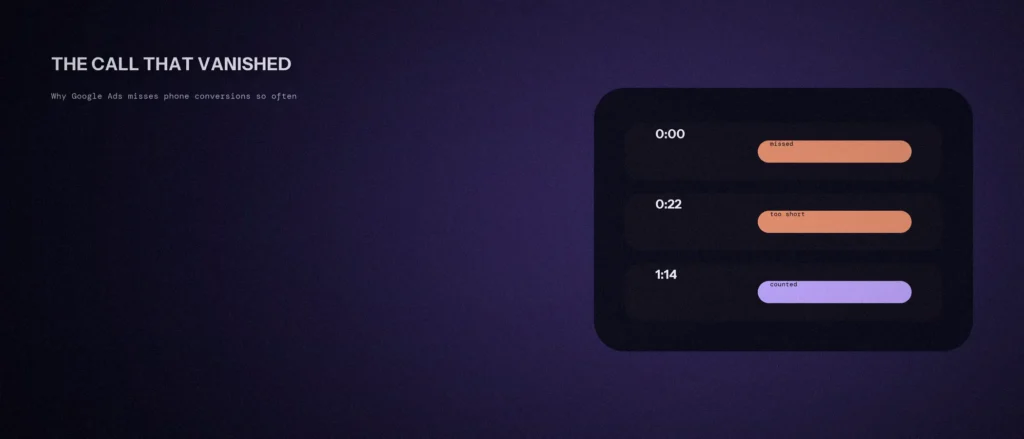
A call conversion is only recorded when a call lasts at least the minimum length you set. A missed call has no length to measure, so it can never pass that bar. A missed call from someone ready to buy is still a real lead, and Google Ads will never show it. If your team misses calls in busy hours, your reported conversions undercount real demand.
The call that didn’t last long enough
“Are you open on Saturdays?” answered in twenty seconds is a real conversation, and sometimes a real lead. If your minimum length is set for long sales calls, short enquiries will never count. Set the length to match what a valuable call sounds like for your business.
The call that never used the tracked number
Google Ads can only count a call that goes through the forwarding number it gave you. A call to the number on your Google Business Profile, on a printed flyer, or on an old page you forgot to update does not touch Google’s tracking. Nothing about it looks broken, which is why it goes unnoticed. This links to our guide on setting up conversion tracking before you spend.
The tap that is not a call
If you track clicks on a number on your mobile website, Google can only count the taps. It cannot tell whether the caller got through, spoke to anyone or hung up. A tap is a signal, not a confirmed call, so do not read it as the same thing.
A detail for India
Google’s call reporting page says the caller’s phone number is shown for calls over 15 seconds, except in India. It also notes that on some calls in India, Caller ID shows a Google number and not the caller’s. So a missing caller number in your log does not mean your setup is broken. It is how the system works in this region.
How to check that it works
Do not trust the report until it matches what your phone received. Clicking your own ads to test costs you money, so lean on these checks first.
- List every place your phone number appears: your website, ads, Google Business Profile, printed material and email signatures.
- In Google Ads, open your call conversion action and check that its status shows it is set up and recording.
- For one week, count the calls your phone or phone system received. Then compare that with the calls and conversions Google Ads reports.
- Call each number that is not meant to be tracked, such as the one on your profile, to confirm it rings and is answered. Remember those calls will not appear in Google Ads.
- Make every public place show the same number, or decide on purpose which ones are tracked.
A big gap between your phone records and your reports is the signal to look for the silent gaps above. And when the phone rings in busy hours, remember that every missed call is a lead Google Ads will never show you. That is a staffing problem worth solving on its own.
What call tracking costs
Google says website call tracking uses Google forwarding numbers that replace your number on your site without any cost to you. For call ads and assets, Google says you are charged for a click on the ad, the same as any ad click, and not for people who dial the forwarding number by hand.
Third-party call tracking tools are paid services with their own prices, so check the provider’s pricing page. They can be worth it when you need more detail than Google gives you, such as tracking many numbers. If you use one, turn off call reporting so your own number shows.
A prompt to find missed phone conversions
If your ads bring calls but your reports show none, you are losing sight of what works. The prompt below helps you list every way a customer can call you and how each one should be tracked. Fill in your own details, then check the setup yourself.
Act as a Google Ads tracking assistant. Help me find phone calls my reports may be missing.
My setup:
– Where my phone number appears: [website header, contact page, ads, Google Business Profile, printed material]
– Whether I use call assets or call ads: [yes or no]
– Whether I use Google forwarding numbers or a third-party tool: [name, or none]
– My minimum call length for a conversion: [for example 60 seconds, or not sure]
– What counts as a real lead for me: [for example a booking enquiry]Please do the following:
1. List every place a call could come from and say whether it is likely tracked.
2. Suggest how to track each one in plain steps.
3. Give me a simple way to compare my phone records with my Google Ads reports.Rules:
– Do not invent menu names. If you are unsure of a setting, say so.
– Tell me where I need a developer or a call tracking tool.
– Keep the steps short.
Compare the answer with your own phone records. Only trust the numbers once the two agree.
Questions about call tracking
How does Google Ads call tracking work?
Google replaces your business number with a Google forwarding number on your ad or website. When a customer clicks your ad and calls that number, the call is routed to you and Google records details such as the length. A call becomes a conversion when it lasts at least the minimum length you set.
What types of phone calls can Google Ads track?
Five types: calls from ads, calls to a number on your website, clicks on a number on your mobile website, clicks on call ads and assets, and imported call conversions. The mobile website option only counts clicks, not calls.
Why don’t missed calls show up as conversions?
A call counts only when it lasts at least the minimum length you set, and an unanswered call has no length. So missed calls never pass the bar, even when the enquiry was real. Track missed calls separately, for example in your phone system.
How do I check if my call tracking is working?
Check the status of your call conversion action in Google Ads, then compare a week of calls on your own phone records with the calls Google Ads reports. A big gap means some calls are missed, too short, or going through a number that is not tracked.
How much does call tracking cost?
Google says website call tracking uses Google forwarding numbers at no cost to you. Third-party call tracking tools charge their own fees, so check their pricing. They can help if you need more detail than Google offers.
Does the caller’s phone number show for calls in India?
Not reliably. Google says caller numbers appear for calls over 15 seconds except in India, and that on some calls in India Caller ID shows a Google number. Do not assume a blank or Google number means your setup is broken.
Where this matters
Call tracking only helps if it records the calls your customers really make. Set the minimum length to fit your business, keep one tracked number everywhere you can, and compare your reports with your own phone records. Then your reports will show what the ads are doing.
If you would like us to check your tracking, our Google Ads management starts with a tracking review, so you know what the numbers mean before you spend more.