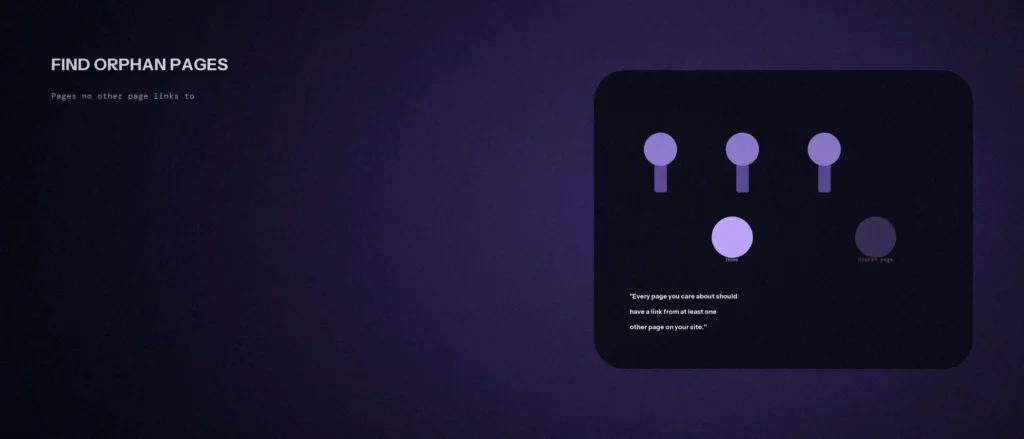
An orphan page is a page on your website that no other page links to, which makes orphan pages an SEO problem as well as a navigation problem. An orphan page is live and may even be good, but a visitor clicking through your site will never reach it, and Google has less to go on when it decides what the page is about. Most sites have more of these than the owner expects, and we found some on our own.
This post explains what orphan pages are, what Google says about internal links, three ways to find orphan pages on your site, and how to fix them. We re-read Google’s link guidance on 11 October 2026, and we ran the check below on our own site the same day. Where something is our own method or result, we say so. The linking discipline that stops new orphans forming is covered in our post on what a content silo is.
Quick summary, if you’re short on time:
- Google’s guidance says every page you care about should have a link from at least one other page on your site.
- Google says it uses links as a signal when determining the relevancy of pages and to find new pages to crawl.
- Links must be
<a>elements with anhrefattribute for Google to crawl them reliably. - To find orphan pages, compare the list of pages you want indexed, such as your sitemap, with the list of pages a crawl reaches by following links.
- On 11 October 2026 we ran this on our own site. Our sitemap lists 129 URLs, and a crawl from the homepage reached 115 of them. The other 14 are linked only to each other.
Jump to a section:
- What an orphan page is
- What Google says about internal links
- How orphan pages happen
- How to find orphan pages
- What we found on our own site
- How to fix an orphan page
- How to stop new orphans
- A prompt to compare your two lists
- Questions about orphan pages
What an orphan page is
A page becomes an orphan when it exists and can be opened, but no other page on the site links to it. A visitor could only arrive through a direct address, a search result or an old bookmark. They could never click their way there from your homepage or menu.
It helps to separate three things that look similar:
- An orphan page is open to everyone and meant to be found, but not linked from anywhere on the site.
- A blocked page carries a noindex tag or a robots.txt rule on purpose. That is a decision, not a gap.
- A weakly linked page has one or two links, often only from a long list or the footer. It is not an orphan, but it gets little help.
An orphan can still appear in your XML sitemap. That tells Google the page exists, but it does not tell Google, or a visitor, how the page fits into your site.
What Google says about internal links
Your internal link structure is how search engines and visitors move through your site. A page with no internal links pointing to it sits outside that site structure, and an orphan page may be crawled less often and understood less well as a result.
Google’s page on link best practices (last updated 10 December 2025) makes three points that matter here:
- Links help Google find pages and judge relevance. Google uses links as a signal when determining the relevancy of pages and to find new pages to crawl.
- Every page you care about needs one. The page says every page you care about should have a link from at least one other page on your site, and to link to pages in context, where they help the reader.
- The link must be crawlable. Google says it can generally crawl a link only if it is an
<a>HTML element with anhrefattribute. It says links that depend on script events are not reliably extracted. A menu item built only with JavaScript can look like a link and still be invisible to Google.
The same page says anchor text, the visible words of a link, should be descriptive, concise and relevant, and that there is no magical ideal number of links for a page. So the aim is not as many links as possible. It is that each page you care about is reachable, with a clear link in a sensible place.
How orphan pages happen
- A redesign changes the menu, and pages that sat in the old navigation are left with no new link.
- A page is published and never linked. This is the commonest cause on a blog: the post goes live and nobody adds a link from an existing page.
- A hub or category page is removed, and the pages it linked to lose their only link.
- A campaign or seasonal page is unlinked from the homepage when the campaign ends, but never redirected or deleted.
- A cluster is built in isolation. A set of pages, such as location pages, link to each other but nothing outside the group links in. This is the one we found on our own site.
- Links exist but are not crawlable, such as a menu that only works through JavaScript.
How to find orphan pages
You can identify orphan pages with free tools like Screaming Frog and a spreadsheet. The idea is the same in every method: make a list of pages that should be reachable, make a list of pages that actually are reachable, and look at the difference.
- Get the list of pages that should exist. Use your XML sitemap, your CMS page and post lists, or the pages you see in Google Search Console.
- Crawl your site from the homepage, following links the way a visitor would. A free crawler such as the free version of Screaming Frog, which its company says crawls up to 500 URLs, is enough for a small site. Export the list of URLs it reached.
- Compare the two lists in a spreadsheet. Put both in columns and check which sitemap URLs never appear in the crawl. Those are your likely orphans.
- Check each one by hand. An orphan page may still have a link from a place the crawler skipped, such as a sidebar or a footer block. Visit the page and look for any link that points to it, including from the footer, a sidebar or a related-posts block. A tool can miss links, and a tool can find links Google cannot use.
- Use Google Search Console as a cross-check. Pages that Google reports as indexed but that your crawl never reached deserve a look, since Google may have found them through the sitemap or an external link.
- Count the weak ones too. List pages with only one inbound link, because a single link from a long footer is not much help.
Our own method is the same, and it can be scripted. We wrote a short script that read our sitemap, followed every link from the homepage, and compared the two.
What we found on our own site
We ran the check on 11 October 2026 on the local copy of zunelo.in, which is the version we push live. The method follows ordinary HTML links only, so a link that works only through JavaScript would not be counted, and that matches Google’s own rule above.
| What we measured | Result |
|---|---|
| URLs in our sitemap | 129 |
| Sitemap URLs reached by following links from the homepage | 115 |
| Sitemap URLs not reached | 14 |
| Pages reached with only one inbound link | 9 |
The 14 pages we did not reach are our United Arab Emirates pages: eight agency pages (the UAE, Dubai, Abu Dhabi, Sharjah, Ajman, Fujairah, Ras Al Khaimah and Umm Al Quwain) and six service pages for Dubai, Abu Dhabi and Sharjah. They link to each other, so they are not dead ends. But nothing outside that group links in, not the homepage, not the menu, not our locations page, and not a blog post. For Google and for a visitor, they form an island.
The nine pages with a single inbound link are seven blog posts and two service pages. That is a fixable pattern, and it shows why the “link it at publish time” step matters.
This is a real finding on our own site, and a useful one. It is not yet fixed. We will decide where those pages should be linked from, and link them from pages that make sense in context, as Google advises. We will report on that when it is done.
How to fix an orphan page
For each page, make one of these decisions:
| If the page… | Then |
|---|---|
| Still serves a real purpose and ranks or should rank | Link to it from at least one relevant page, in the body text, with a clear anchor |
| Is one of a group of related pages | Add a hub or index page that links to all of them, and link the hub from your main navigation or a high-level page |
| Overlaps another page that is linked | Merge the useful content into the linked page and redirect the old address |
| Is out of date and has no use | Remove it. If it ever had traffic or links, redirect it to the closest relevant page |
| Is meant to be private or temporary | Add a noindex tag, or take it off the sitemap, so it is not mistaken for a gap |
To fix orphan pages well, find the page that a reader would naturally visit before this one, and add the internal links pointing to the orphan from there. When you add a link, write it for a reader. Put it where it helps, use words that describe the destination, and do not add a block of links to a footer just to tick a box. Google says there is no magic number, so one good link is better than twenty forced ones.
How to stop new orphans
- Make linking part of publishing. Before any post or page goes live, name at least one existing page that will link to it, and add that link at the same time.
- Link new pages from a hub. If you have a blog index or a services page, make sure it can reach new content.
- Re-run the comparison after a redesign or a site migration, because that is when menus change and orphan pages appear.
- Check once or twice a year. A 30-minute check catches pages that slipped through.
- Use real links. If a menu is built with a script, make sure the page also has ordinary
<a href>links.
A prompt to compare your two lists
An AI tool is good at comparing two long lists, which is the dull part of this job. It cannot see your site, so give it the real lists, and check the result by hand.
Act as a careful site auditor. I will give you two lists of URLs from my own website and I want to find pages that no other page links to.
My details:
– List A, the pages that should be reachable (from my sitemap): [paste, one per line]
– List B, the pages a crawl reached by following links from my homepage: [paste, one per line]
– What each important page is about, in a few words (optional): [paste]Please do the following:
1. List every URL in List A that does not appear in List B. These are my likely orphan pages.
2. Group them by section or topic where you can see a pattern, for example all under the same folder.
3. For each group, suggest which type of page on my site should link to it, and why, using only the topics I gave you.
4. Tell me which items you are unsure about.Rules:
– Compare the lists exactly. Do not guess URLs, and do not treat two different addresses as the same page.
– Do not invent pages or topics I did not give you.
– Write in plain, simple English.
Open each suggested page and read it before you add a link. A topic that matches in a list can still be a poor fit when you read both pages.
Questions about orphan pages
What is an orphan page in SEO?
A page on your site that no other page links to. It can be opened and may be indexed, but a visitor cannot click through to it, and Google has fewer signals about how it relates to the rest of your site.
How do I find orphan pages on my website?
Compare a list of the pages that should exist, such as your sitemap, with a list of pages a crawl reaches by following links from your homepage. Any sitemap page missing from the crawl is a likely orphan. Check each one by hand.
Can Google find an orphan page through my sitemap?
A sitemap can tell Google a page exists. Google’s guidance also says it uses links to find new pages and as a signal for relevance, and that every page you care about should have a link from at least one other page.
Should I delete orphan pages?
Only if the page has no purpose. If it still answers a real question, link to it. If it overlaps another page, merge the content and redirect the old address. Deleting a page with traffic or links and no redirect can lose that value.
How many internal links does a page need?
At least one from another page on the site, according to Google’s guidance. Google says there is no magical ideal number, so link where it helps the reader and use clear, descriptive anchor text.
Is a page in my navigation menu always linked?
Only if the menu uses real links. Google says it can generally crawl a link only if it is an anchor element with an href attribute. A menu that works only through script events may not be read as links.
Do orphan pages hurt my whole site?
We have not seen Google say they harm the rest of your site. The risk is to the orphan pages themselves, which get less discovery and less context. A lot of orphans is also a sign of a wider linking problem worth fixing.
Where this matters
Orphan pages are content you have already paid for, sitting cut off from the rest of your site. A one-hour comparison of your sitemap and a crawl shows them, and most fixes take a link or two. Make adding a link part of publishing, so the next page does not become one.
If you would like us to run this check on your site, send us your website address and we will tell you what we see.