AI visibility is hard to measure because there is no ranking report for ChatGPT. Nobody can tell you “you are number 3 for plumbers in Bangalore”, because an AI assistant writes a fresh answer each time you ask. But you can still find out whether it mentions your brand, how it describes you, and who it names instead. It takes a notebook, a list of real customer questions and about 30 minutes a month, and it is the simplest way to track brand mentions in AI answers.
This post gives a manual method to check if ChatGPT mentions your brand, and how to do the same for Perplexity, Gemini and Google’s AI features. It covers what to ask, how to log the answers, how to read the results, and what Google actually reports about its own AI features. We re-read Google’s Search Console help page on 10 October 2026. The checking method is our own, and we say so where it is. For the bigger picture of why this matters, see our post on brand mentions vs backlinks in AI search.
Quick summary, if you’re short on time:
- Ask real customer questions, not just your business name, in a fresh chat each time. One check proves little because answers vary.
- Log four things for each answer: whether your brand appears, how it is described, who is mentioned instead, and any sources shown.
- Repeat the same questions monthly. Look for a pattern across several checks, not a single result.
- Google does report on its own AI features. Search Console’s generative AI performance report shows impressions in AI Overviews and AI Mode, by page, country, device and date, and was rolled out to all websites worldwide on 31 August 2026.
- No free brand mention tracker shows how often ChatGPT mentions you. Paid trackers exist, and we have not tested them.
Jump to a section:
- Why this isn’t like checking a Google ranking
- The 30-minute manual method
- Which questions to ask
- What to log each time
- What Google reports about its own AI features
- Look for visits from AI tools
- What to do with what you find
- Two prompts: build the questions, then read the log
- Questions about tracking brand mentions in AI
Why this isn’t like checking a Google ranking
That is why visibility tracking for AI is a different job from rank tracking. A Google ranking is a position on a list that you can check today and check again tomorrow. An AI assistant works differently. It generates a new answer each time, so the same question can return a different set of businesses, in a different order, with different wording. That means a single check is a snapshot, not a measurement.
It also means the person who asks matters. Answers can change with the words used, the place, the tool and whether the chat has earlier messages in it. So the useful question is not “am I number one?” It is “across 20 realistic questions, over three months, how often am I named, and is it accurate?”
The 30-minute manual method
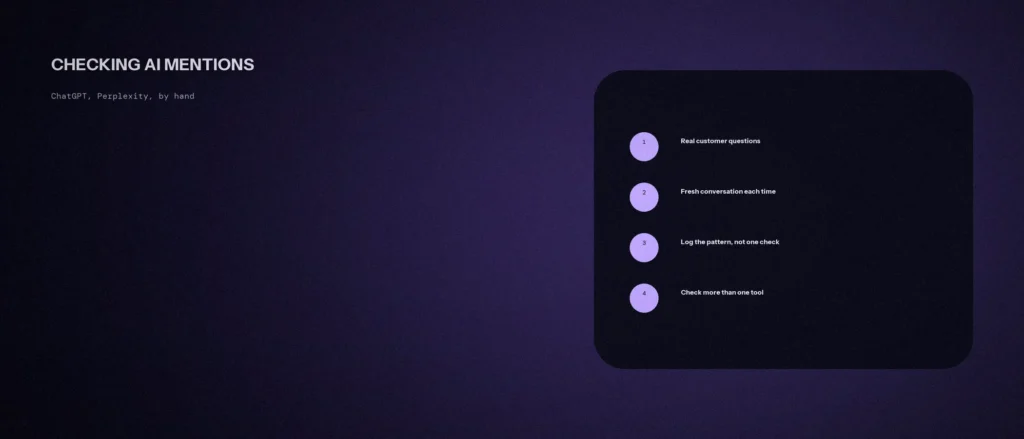
- Write 10 to 15 real questions a customer would ask. Use the section below for a mix.
- Open a fresh chat for each question. Earlier messages in the same chat can shape the answer.
- Use the same question wording each month, so you can compare results over time.
- Check more than one tool. ChatGPT, Perplexity, Gemini and Google’s AI Overviews do not work the same way, and they can return different businesses for the same question.
- Read the whole answer. Do not stop at “was I mentioned?” Note what was said about you and about others.
- Copy the sources. If a tool shows links, note which pages it cited. Those pages are doing the work.
- Write it all down straight away, in one place, with the date.
If you want a paid tracking tool later, the same log tells you what to ask it to measure, and gives you a baseline to compare it against. Until then, a spreadsheet does the job. Be careful with logged-in history. If you have used a tool for a while, it may remember your business and lean towards it. Where the tool allows it, use a signed-out window or a temporary chat for a fairer test. We cannot say how each tool handles this, so treat any history as a possible bias.
Which questions to ask
In AI circles these questions are called prompts, and the set you test is your prompt list. The aim is to see how ChatGPT answers, and how often your brand is mentioned across ChatGPT responses and other AI platforms, for the questions your customers really ask.
Do not only type your brand name, because that tells you what the tool knows about you, not whether it recommends you. Use all five types below.
| Type | Example for a Bangalore dental clinic | What it shows |
|---|---|---|
| Discovery | “Which dental clinics in Indiranagar are good for braces?” | Whether you are named when someone is choosing |
| Problem-based | “My child’s tooth is cracked, who should I see in Bangalore?” | Whether you are named for a specific need |
| Comparison | “Clinic A or Clinic B for root canal treatment?” | How you are described next to a named competitor |
| Local and practical | “Which dentists near me are open on Sunday?” | Whether your hours and details are picked up |
| Brand check | “What do people say about [your clinic]?” | Whether the description is accurate and current |
The clinic and the questions are a made-up example. Use your own services, areas and the words your customers use. Our post on what questions your buyers actually ask AI assistants covers finding them.
What to log each time
A spreadsheet is enough. These columns work:
| Column | What to write |
|---|---|
| Date and tool | For example “12 Oct, ChatGPT” |
| Question | Paste it exactly |
| Brand appears? | Yes, no, or only when asked by name |
| How you are described | Paste the sentence, and mark it accurate, outdated or wrong |
| Who appears instead | List the names |
| Sources shown | The pages or sites cited, if any |
| Notes | Anything odd, such as a wrong address or a closed branch |
A simple score, which is our own method and not an industry standard: divide the number of answers that mention you by the number of questions you asked. If you asked 12 questions and were named in 3 answers, your mention rate is 25% for that tool that month. Track it month by month and compare like with like.
What Google reports about its own AI features
For Google’s AI features you do not have to guess. For Google AI, Google’s help page on the generative AI performance report says that as of 31 August 2026 it was rolled out to all websites worldwide. The report shows how your site performs in generative AI features on Google Search. Here is what it contains:
- What it counts: impressions, meaning how many times links to your site were shown to a user in a generative AI feature on Google Search.
- Which features: AI Overviews and AI Mode.
- How you can cut it: by pages (the final URL linked), countries, dates (in Pacific Time) and devices.
- What it leaves out: data from experiments in Search Labs.
- A counting rule: if two results from your site appear in one generative AI feature, they count as a single impression in the chart total.
- If you can’t see it: Google says this usually happens when your site hasn’t received enough impressions in generative AI features.
This tells you which of your pages Google’s AI features link to. It does not tell you what ChatGPT or Perplexity say. Our post on Search Console’s AI performance reports covers how to read it.
Look for visits from AI tools
Brand visibility in an AI answer is one thing and visits are another. In Google Analytics, look at where your sessions come from and filter the source for names such as chatgpt, perplexity or gemini. Several guides report that ChatGPT adds utm_source=chatgpt.com to the links it shows. We have not confirmed that on OpenAI’s own pages, so check what your own Analytics property records. Some visits will not carry any source information at all, so the true number is likely higher than what you see.
For links you control, such as one in an email signature or a social profile, you can add your own UTM tags so those visits are clearly labelled.
What to do with what you find
- Not mentioned at all. Note how often your brand is mentioned across all the prompts, not just one, because one empty answer proves little. Look at who is mentioned and why. Check their reviews, their listings and the pages cited. Then check whether your own site and profile say clearly what you do, where, and for whom.
- Mentioned, but wrongly. Look for the source of the wrong detail: an old listing, a former address, a closed branch. Fix it at the source. You cannot edit the assistant’s answer directly.
- Mentioned only when asked by name. You are known, but not yet recommended. Work on being clearly described in more places than your own website.
- Mentioned by one tool and not another. This is common. Look at which sources each tool cited.
Our post on schema and entity gaps explains why inconsistent information across your listings leads to a muddled answer. Do not try to game any one AI answer or platform. None of them publishes exactly how it chooses what to name, so the safe path is clear, consistent and accurate information about your business in several places.
Two prompts: build the questions, then read the log
An AI tool is useful at both ends of this job, as long as it works from your real details. It cannot check what other assistants say, so you still run the questions yourself.
Prompt 1: build your question list.
Act as a customer research assistant. Help me write the questions I will use to check whether AI assistants mention my business.
My details:
– What I do and where, in one line: [describe]
– The areas I serve: [list]
– Problems customers come to me with, in their own words: [list 3 to 5]
– Competitors I know of, if any: [names, or say not sure]Please do the following:
1. Write 12 questions a real customer might type, grouped as discovery, problem-based, comparison, local and practical, and brand check.
2. Use plain words customers use, not marketing language.
3. Put each question in a table with a column for the type.Rules:
– Use only the details I gave you. Do not invent competitors, areas or services.
– Do not write questions that include my brand name except in the brand check type.
– Write in plain, simple English.
Prompt 2: read your log. After two or three monthly rounds, paste your log into the prompt below.
Act as a careful analyst. I will paste a log of AI assistant answers about my business. Find the patterns, using only what is in the log.
My log: [paste the table]
Please do the following:
1. Tell me my mention rate for each tool and month, showing the sums.
2. List the businesses that appear most often, and the sources cited most often.
3. List every place my business was described wrongly or out of date.
4. Suggest three things I could check or fix first, and say why for each.Rules:
– Use only the numbers in my log. Do not invent rankings or benchmarks.
– If the log is too small to show a pattern, say so.
– Write in plain, simple English.
Check any claim the AI makes about a pattern against the log before you act on it.
Questions about tracking brand mentions in AI
How do I check if ChatGPT mentions my brand?
Ask it 10 to 15 real customer questions, each in a fresh chat, and log whether your brand appears, how it is described and who is named instead. Repeat monthly. A pattern across several checks means more than one answer.
Is there a free tool that tracks ChatGPT mentions?
Not one we can recommend. Paid trackers exist, and some of them appear in the search results for this topic, but we have not tested them. A manual log costs nothing but time and is a sound starting point.
Why was I mentioned once and not the next time?
AI assistants write a new answer each time, so results vary between checks. That is why a single check tells you little and a monthly log tells you more.
Can Search Console show how often ChatGPT mentions me?
No. Search Console’s generative AI performance report covers Google’s own features, AI Overviews and AI Mode. It shows impressions by page, country, device and date, and it does not cover ChatGPT, Perplexity or Gemini.
What if an AI tool gives wrong information about my business?
Look for where the wrong detail comes from, such as an old listing or an outdated page, and correct it at the source. Then check again in the next monthly round.
How often should I check?
Monthly is a sensible start for most small businesses. Check more often only around a specific change, such as a new review push or a major website update, so that you can see its effect.
Where this matters
You cannot rank-track an AI assistant, but you can measure how often it names you, how it describes you and who it picks instead. Write 12 questions, run them in a fresh chat each month, keep the log and fix the sources behind any wrong answer.
Want help with AI visibility? See our AI SEO and GEO service, or send us your website address and we will tell you what we see.