A content brief is a one-page set of instructions you write before anyone writes a blog post. It says who the post is for, what question it answers, which keyword it targets, what it must link to, and what it should leave out. Most blogs skip it, and that is why so many posts end up repeating each other or competing with the service page they were meant to support.
This post shows how to write a blog post brief that works for a business website: the ten things to put in it, a template you can copy, a worked example, and the mistakes to avoid. It also covers the problem that matters most to a small business, which is keeping a post from competing with your own service page. We checked the Google statement below against Google’s own page on 6 October 2026. Where something is our own method, we say so.
Quick summary, if you’re short on time:
- A good content brief is one page long and is written before the post, not after.
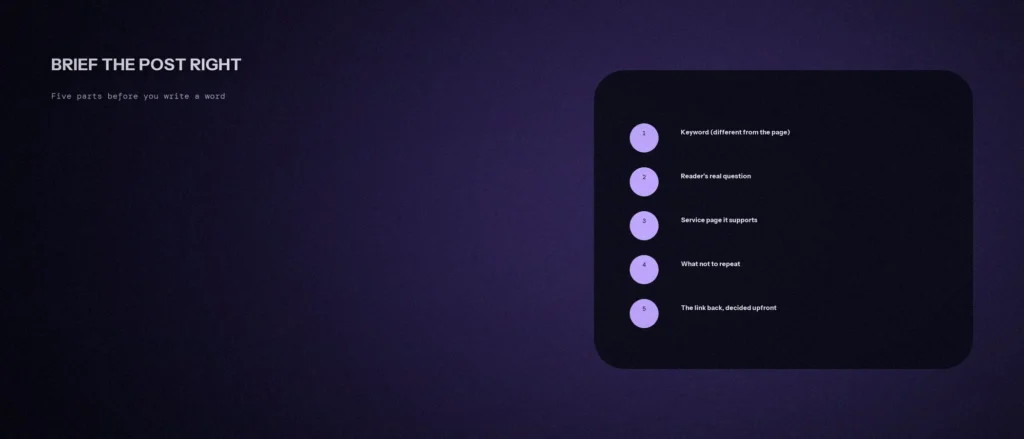
- It has ten parts. The most important are the keyword and search intent, the reader’s real question, the service page the post supports, and what the post should not repeat.
- Google’s ranking systems guide says its site diversity system generally won’t show more than two listings from the same site in its top results. Two of your own pages going after the same search can therefore crowd each other and confuse readers.
- Give every post its own keyword, check the search results to confirm the intent is different from your service page, and decide the link before you write.
- An AI tool can fill in a first draft of a brief from your details, but you have to check the keyword overlap yourself.
Jump to a section:
- What a content brief is and why it matters
- What to put in a blog post brief
- How to stop a post competing with your service page
- A worked example
- A content brief template you can copy
- Common mistakes, even with a brief
- A prompt to draft your brief
- Questions about content briefs
What a content brief is and why it matters
Think of a brief as the instructions you would give a builder before they start work. It lets a content writer, whether that is you, a team member or an agency, produce the right post the first time. Without one, the writer guesses the keyword, the angle and the reader, and the post often has to be rewritten.
Creating a content brief is the cheapest part of content creation, and an effective content brief helps a content creator work faster and guess less. A brief also protects your site. Content marketing works when every post has a job, and a brief helps make the job clear. A brief makes you decide that job first: is this post answering a question, supporting a service page, or filling a gap? If you cannot say in one sentence what the post is for, it is not ready to be written.
It is also where a marketing strategy turns into real pages, and where you decide to create content that answers one question well. Our post on building a keyword-to-URL map shows how to give each page its own search. The brief is the document that carries that decision into each post.
What to put in a blog post brief
| # | Part of the brief | What to write |
|---|---|---|
| 1 | Working title | A plain title that includes the main keyword. You can improve it later |
| 2 | Target keyword and intent | One main keyword, plus what the searcher wants: an answer, a guide, a comparison or a service |
| 3 | The reader’s real question | The exact question a real person would type, and who they are |
| 4 | The page it supports | The service page, or the parent post, this post will point to |
| 5 | What not to repeat | Topics the service page or other posts already cover in full |
| 6 | Outline of headings | The H2 headings you expect, in order, with one line each |
| 7 | Questions to answer | Five or six real questions for the FAQ section |
| 8 | Sources to check | The primary sources, such as the platform’s own help page, that every fact must trace back to |
| 9 | Length, format and style | A word count range, reading level, tone and any style guide to follow |
| 10 | Links and deliverables | Links to include, the call to action, plus the meta title, meta description and image as deliverables |
On the word count: take it from the pages already ranking for your keyword, and do not chase a fixed number. Google’s guide to generative AI features says there is no ideal page length and that pages should be made for your audience.
How to stop a post competing with your service page
This is the part most briefs leave out. Suppose your service page targets “SEO services Bangalore” and a blog post is titled “Best SEO Services in Bangalore”. Both pages are now answering the same search.
Google’s guide to its ranking systems describes a site diversity system. It says Google generally won’t show more than two web page listings from the same site in its top results, so that no single site tends to dominate, and that it can show more when its systems decide that is especially relevant. The page was last updated on 10 December 2025.
That does not mean two of your pages are penalised. It does mean you cannot count on both showing, and our view is that two similar pages split your links, your clicks and your message. Our post on keyword cannibalisation explains how that slows growth.
Three checks put the problem right in the brief:
- Different keyword. The post’s keyword should be related to the service page’s keyword but not the same. “How long does local SEO take” supports a local SEO page. “Local SEO services” competes with it.
- Different intent. Search for the post’s keyword and look at the first page of search results, the SERPs. If it shows service pages, the intent is to hire someone, and a blog post is the wrong format. If it shows guides and answers, a post fits. Search for the service page’s keyword too, and compare.
- One parent, decided up front. At Zunelo, a supporting post links to one parent post, and that parent post links to the service page. A sub-topic post does not link straight to the money page. That is our own linking model, not a Google rule. Our post on content silos explains the idea.
A worked example
Take a made-up physiotherapy clinic in Bangalore. Its service page is /physiotherapy-bangalore/, and it targets “physiotherapy in Bangalore”. A weak brief says “write about back pain”. A real brief looks like this:
- Working title: How Long Does Back Pain Physiotherapy Take to Work?
- Keyword and intent: “how long does physiotherapy take for back pain”. The search results show guides and answers, so a blog post is the right format. This is different from the page’s “physiotherapy in Bangalore”, where the results are clinics.
- Reader’s question: a person with back pain who has just booked a first session and wants to know what a realistic timeline looks like.
- Supports: the parent post on back pain treatment, which links on to the service page.
- Do not repeat: the list of treatments, prices and booking details, which the service page already covers.
- Sources: the clinic’s own physiotherapists, plus a named medical source for any claim about recovery times. No invented timelines.
That brief gives the writer a post that answers a real question, which the service page does not, and sends the reader onward once they are ready to book. Our post on review recency vs review count follows the same pattern: a specific sub-topic that sits under a service page’s subject.
A content brief template you can copy
Paste this into a document and fill it in before each post. It is the same ten parts as the table, in a format a writer can use.
CONTENT BRIEF
1. Working title:
2. Target keyword and search intent:
3. Reader and their real question:
4. Page this post supports (and the one sentence that links to it):
5. What not to repeat:
6. Outline (H2 headings, one line each):
7. Questions for the FAQ (5 or 6):
8. Sources every fact must trace to:
9. Word count range, reading level and tone:
10. Links, call to action, meta title, meta description, image:
Keep the whole thing to one page. If a brief needs two, the post is probably trying to do two jobs.
Common mistakes, even with a brief
- Same keyword in different words. “How much does SEO cost” and “SEO pricing guide” are close enough to compete. Judge the intent, not just the words.
- Writing the brief after the post. A brief written to justify a finished post rarely catches the overlap it was meant to catch.
- A topic, not a question. “Local SEO” is a topic. “How long does local SEO take” is a question a person can ask. Briefs built on questions produce posts that answer something.
- Forcing the link. If the post does not lead naturally to the service page, link to a more relevant post, or skip the link.
- No sources. If the brief does not name where facts will come from, the writer will fill gaps from memory, or from an AI tool that can invent them. Our post on fact checking AI generated content covers that risk.
- Copying a competitor’s outline. Use the top results to learn the intent and the questions, then add what you know first-hand that they do not. That is how a post becomes high-quality content and not a copy.
A prompt to draft your brief
An AI tool can turn your rough idea into a first brief in a minute. It cannot see Google, so the overlap check stays with you. Give it your real details.
Act as a content strategist. Draft a one-page content brief for a blog post that supports one of my service pages without competing with it.
My details:
– Service page address and its main keyword: [address, keyword]
– What that page already covers in full: [list]
– My rough post idea: [one or two lines]
– Who the reader is: [describe]
– Existing blog posts the new one could link to: [list titles, or say none]Please do the following:
1. Fill in a brief with these parts: working title, target keyword and intent, the reader’s real question, the page it supports, what not to repeat, an outline of H2 headings, five FAQ questions, the kinds of primary sources to check, and a word count range.
2. Suggest a keyword that is related to my service page’s keyword but different from it.
3. At the end, list what I must check myself, such as whether the search results for both keywords show the same kind of page.Rules:
– Use only the details I gave you.
– Do not invent search volumes, rankings or statistics.
– Do not suggest a keyword close enough to compete with my service page.
– Write in plain, simple English.
Then search for both keywords in Google and compare the first page for each. If the same kind of page shows up for both, the keywords are too close, whatever the AI suggested.
Questions about content briefs
What is a content brief?
A one-page document written before a post that tells the writer the keyword, the reader’s question, the page the post supports, what to leave out and which sources to use. It lets the writer produce the right post the first time.
What should a blog post brief include?
At least ten things: a working title, the keyword and intent, the reader’s question, the page it supports, what not to repeat, a heading outline, FAQ questions, sources, length and style, and the links and deliverables. The table in this post lists them.
How long should a content brief be?
One page. If it runs to two, the post is likely trying to do two jobs and should be split. A short brief gets used, a long one gets skipped.
How do I know if a post will compete with my service page?
Search both keywords and compare the first page of results. If the same kind of page ranks for both, a reader would be satisfied by either, so the two pages are likely to compete. Google’s guide says it generally shows no more than two listings from one site, so don’t rely on both appearing.
Does every blog post need a brief?
If the post exists to support a service page or a topic cluster, yes. A short note on the keyword, the reader and the parent page takes ten minutes and saves a rewrite. A quick news post may only need a smaller version.
What word count should I put in the brief?
Use the pages already ranking for your keyword as a guide and give a range. Google’s guide to generative AI features says there is no ideal page length, so write what the reader needs and no more.
Can AI write my content brief?
It can draft one from your details, and that is a good use of it. It cannot check Google for you, so you must confirm the keyword and intent yourself, and verify any facts it adds.
Where this matters
A brief takes about ten minutes and prevents weeks of writing that quietly works against itself. Write it first, give the post its own keyword, check the search results, and decide the link before a word is written.
Want your blog briefed and mapped against your actual service pages? Our SEO services include exactly this kind of planning.