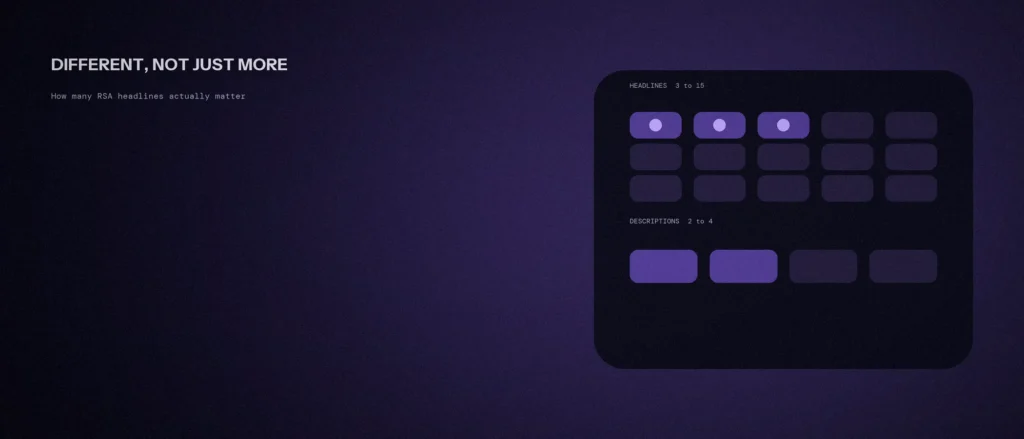
Responsive search ads give you room for 15 headlines and 4 descriptions. Most people fill three headlines, two descriptions, and stop, because that’s all Google asks for. A few others fill all 15 with slight rewrites of the same line and call it done. Both approaches miss what the extra room is actually for.
Here’s what Google’s own documentation says about how many responsive search ad headlines and descriptions you need, and which of those numbers actually matter.
Quick summary, if you’re short on time:
- Google requires a minimum of 3 headlines and 2 descriptions, and allows up to 15 headlines and 4 descriptions per ad.
- Headlines are limited to 30 characters and descriptions to 90, so each slot has to carry one clear idea.
- More headlines only help if they’re different. Google says to provide “as many unique headlines as you can,” because that gives the system more to assemble.
- Ad Strength is feedback, not a ranking input. Google states it “isn’t used to calculate Ad Rank, Quality Score, or auction wins.”
- Pinning limits how many combinations can show, and Google says it “isn’t recommended for most advertisers.”
Jump to a section:
- The actual limits, and what they mean
- Why unique beats more
- What Ad Strength does and doesn’t do
- When pinning helps and when it hurts
- A prompt to draft responsive search ad assets
- Questions worth answering directly
The actual limits, and what they mean
Google’s responsive search ad documentation sets the range plainly: “You’ll need to enter a minimum of 3 headlines, but you can enter up to 15,” and “a minimum of 2 descriptions, but you can enter up to 4.” Headline fields support up to 30 characters, descriptions up to 90.
The minimum is what lets the ad run at all. The maximum is what gives Google room to test combinations. Thirty characters is tight, which is a useful constraint: a headline can only carry one idea, so it forces you to decide what each slot is for.
Why unique beats more
The number of headlines matters less than how different they are. Google’s advice is to “focus on providing as many unique headlines as you can. More headlines give Google Ads more options to assemble your messages into relevant ads, which may increase performance.”
Fifteen near-copies of one line don’t give the system 15 options. They give it one option written 15 ways. A better spread covers different angles: what you do, who it’s for, a proof point, a price or speed signal, a call to action, and a location. That way, different searchers can be matched with the message that fits them. This is the same principle covered in our post on writing ad copy that matches search intent.
What Ad Strength does and doesn’t do
Ad Strength is the rating you see while building the ad: Incomplete, Poor, Average, Good or Excellent. It’s useful as a checklist, and Google recommends “at least 2 responsive search ads with ‘Good’ or ‘Excellent’ Ad Strength per ad group.”
What it isn’t is a ranking factor. Google’s Ad Strength documentation says the rating “doesn’t directly influence your ad’s serving eligibility” and “isn’t used to calculate Ad Rank, Quality Score, or auction wins.” So an Excellent rating doesn’t win you an auction. It only tells you that the ad has the variety Google’s system works best with.
That matters because chasing Excellent by stuffing in filler headlines can make the ad worse. A useful test: would each headline still make sense if it was the only one someone saw? If not, it’s padding. This also sits beside Quality Score, which is a separate measure that does feed into your costs.
When pinning helps and when it hurts
Pinning fixes a headline or description to a specific position. It’s tempting when you need legal wording or a brand name to always show. The cost is flexibility. Google’s guidance is that “pinning reduces the overall number of headlines or descriptions that can be matched to a potential customer’s search,” and that it “isn’t recommended for most advertisers and can affect ad strength.”
If you must pin, Google suggests pinning “just one or 2 essential keyword headlines while letting the rest rotate dynamically.” Pin only what you’re required to show, and leave everything else free.
After the ad has been running, use the asset reports to prune. Google’s guidance on asset reporting is to consider replacing assets that receive zero impressions after several weeks. That’s a better rule than guessing which lines are weak before you have data.
A prompt to draft responsive search ad assets
Responsive search ads need many headlines and descriptions that work in any combination. The prompt below asks an AI tool for a first set. Fill in your details, and check that every line is true and can stand alone.
Act as a Google Ads copywriter. I need assets for one responsive search ad.
The ad group:
– Keyword theme: [for example emergency plumber Bangalore]
– What the landing page offers: [describe]
– Real reasons to choose me: [list, such as response time or free quote]Please do the following:
1. Write 15 headlines, each under 30 characters, that make sense on their own.
2. Write 4 descriptions, each under 90 characters.
3. Tell me which headlines to pin, if any, and why.Rules:
– Do not repeat the same idea in different words.
– Do not make claims I cannot prove.
– No made-up prices or urgency.
Read every headline next to every description to check that any pair still makes sense. Remove anything your page does not support.
Questions worth answering directly
How many headlines and descriptions do I need in a responsive search ad?
Google requires at least 3 headlines and 2 descriptions, and allows up to 15 headlines and 4 descriptions. Its advice is to provide as many unique headlines as you can, since more distinct options give the system more to work with.
Does Ad Strength affect my ad rank?
No. Google states that Ad Strength isn’t used to calculate Ad Rank, Quality Score or auction wins. It’s feedback on how well the ad is built, not a ranking input.
Should I pin headlines in a responsive search ad?
Only when you have to. Google says pinning reduces the number of combinations that can be matched to a search and isn’t recommended for most advertisers. If you do pin, limit it to one or two essential headlines.
How long can responsive search ad headlines and descriptions be?
Headlines support up to 30 characters and descriptions up to 90, according to Google. That’s tight enough that each slot has to carry one clear idea.
How do I know which headlines to replace?
Use the asset reports once the ad has been running. Google’s guidance is to consider replacing assets that receive zero impressions after several weeks, rather than guessing in advance.
What Ad Strength should I aim for?
Google recommends at least 2 responsive search ads with Good or Excellent Ad Strength per ad group. But it also says Ad Strength isn’t used to calculate Ad Rank, so don’t add filler headlines just to reach Excellent.
Where this actually matters
The goal was never to fill every slot. It’s to give Google enough genuinely different messages to match the right one to each searcher, and to keep an eye on which ones earn impressions. Fewer, distinct headlines beat many similar ones.
Not sure whether your own ads are giving the system real variety or just repeating one line? We review this as part of every Google Ads engagement we run.