
Search Console has always told you how you’re doing in regular Google Search. Until recently, it had nothing to say about AI Overviews or AI Mode, even though those features were already changing how many people find your site. That gap just closed.
As of August 31, 2026, Google finished rolling out two related tools to every Search Console property worldwide: a report that shows your AI visibility, and a toggle that lets you opt out of it entirely.
Quick summary, if you’re short on time:
- Search Console now has a Generative AI performance report showing impressions, pages, countries, devices and dates for AI Overviews and AI Mode, but no click data.
- A separate Search generative AI control lets you exclude your site from these AI features completely.
- Google states directly that opting out “isn’t used as a ranking or inclusion signal affecting other parts of Search,” so it won’t help or hurt your normal rankings.
- Both features are live worldwide now, not in limited testing anymore.
- For almost every business, turning the report on and leaving the opt-out alone is the right call.
Jump to a section:
- What the Generative AI performance report actually shows
- What the Search generative AI control does
- Should you actually opt out?
- Where to find both in Search Console
- A prompt to read your Search Console AI data
- Questions worth answering directly
What the Generative AI performance report actually shows
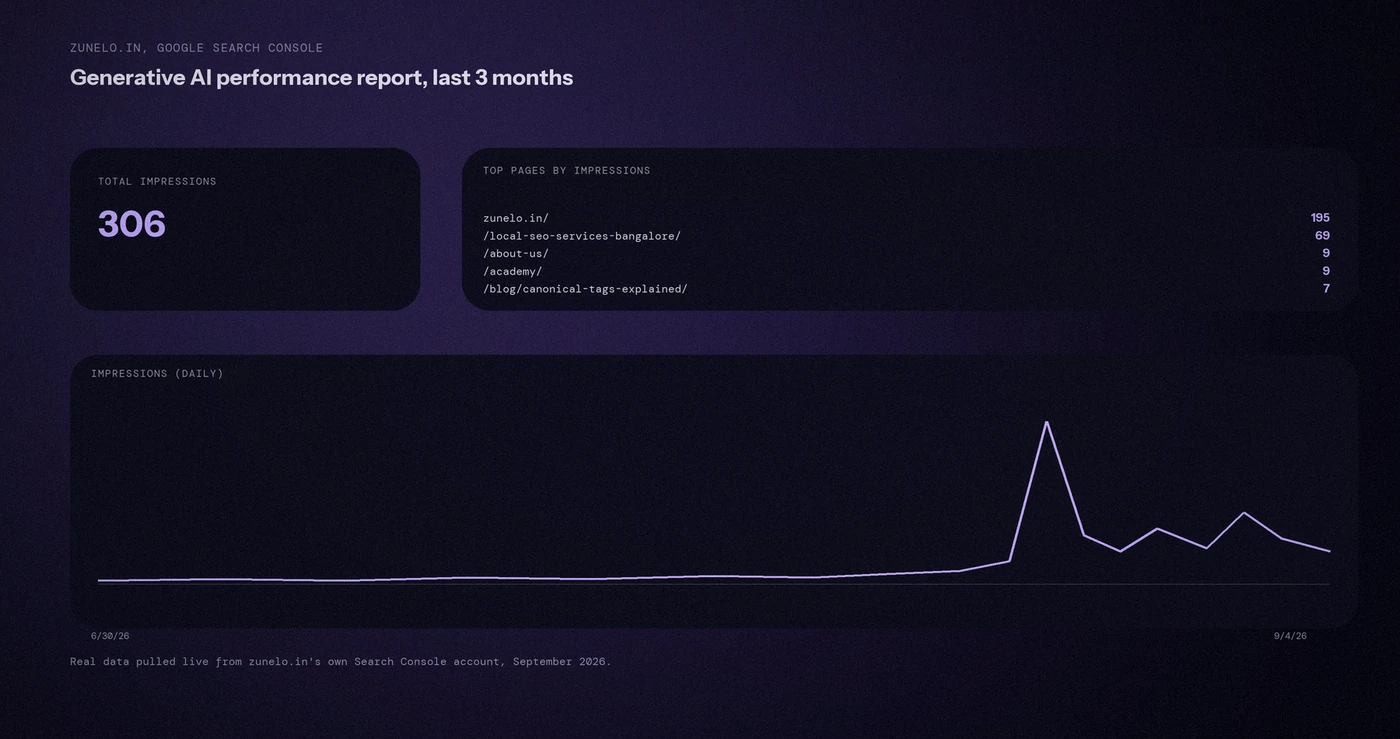
This is a new report inside Search Console’s Performance section, separate from your regular Search performance report. It tracks how your pages show up specifically inside AI Overviews and AI Mode.
Google’s own help documentation is specific about what’s included: impressions, pages, countries, devices and dates. What’s missing matters too. There’s no click data, and Google’s documentation notes it “doesn’t include data from experiments in Search Labs,” so anything still in early testing won’t show up here.
In practice, this means you can see how often your pages get pulled into an AI answer, which pages get pulled in most, and where in the world that’s happening. You still can’t see whether people clicked through afterward, at least not yet.
What the Search generative AI control does
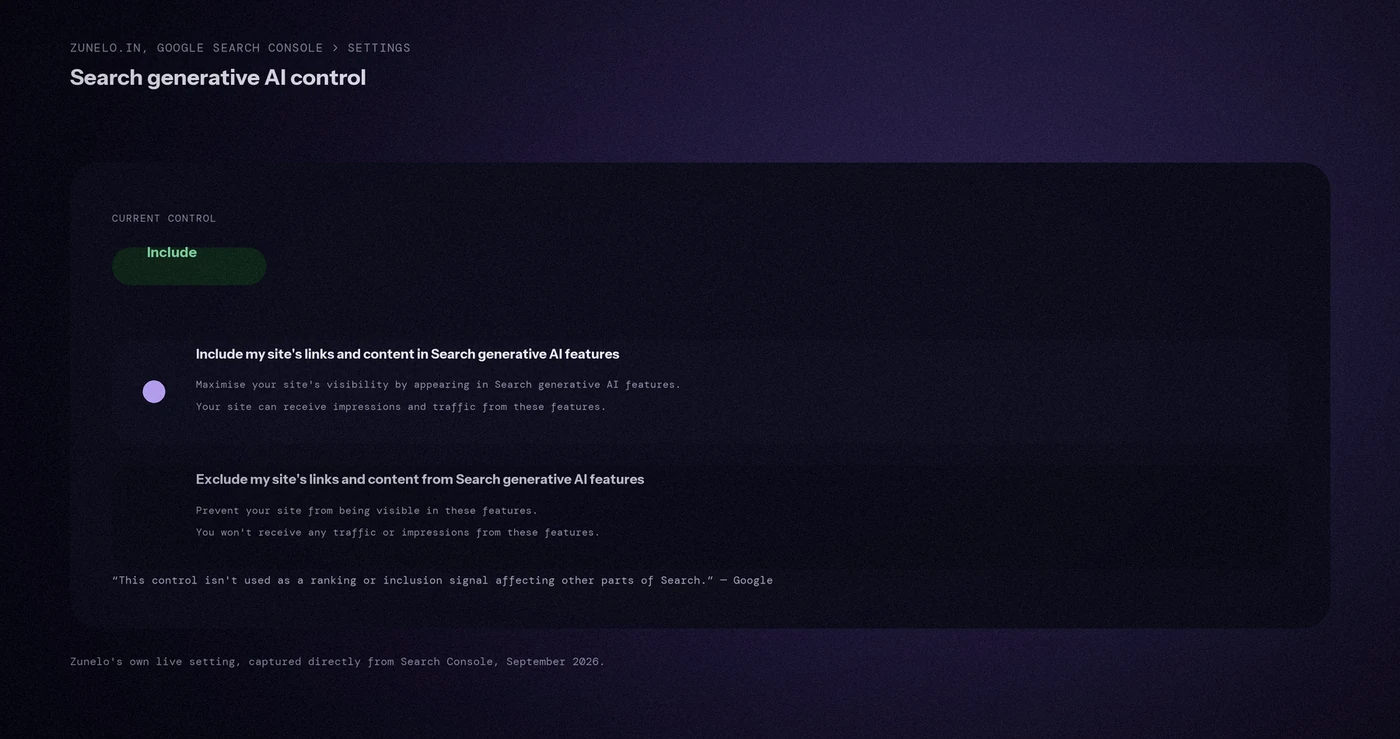
This is a toggle, not a report. Google describes it plainly: it’s there “to manage your site’s inclusion” in AI Overviews, AI Mode and related generative features.
Turn it off, and your content stops appearing in those AI answers altogether. Google’s documentation is direct about what that means: your site becomes “prevented from being visible to users in Search generative AI features, including being linked to within these features and helping with grounding AI responses.”
The one detail worth remembering here is the timing. Google says exclusion takes effect within 1 to 2 days generally, though some content may take longer because of caching.
Should you actually opt out?
For most businesses, no. Google states this control “isn’t used as a ranking or inclusion signal affecting other parts of Search,” meaning opting out doesn’t protect or improve your regular rankings in any way. You’re not trading AI visibility for better search rankings. You’re just giving up one without touching the other.
The businesses where opting out makes sense are narrow. Publishers with a subscription paywall, sites with licensing concerns about their content being reused in AI answers, or businesses in a niche where being cited inside an AI Overview genuinely hurts more than it helps, competitors quoting your pricing data directly, for instance.
For a local service business, AI Overviews are a source of visibility you don’t fully control anyway. The pages Google decides to pull into an AI answer are the same well-optimized pages that already earn regular rankings, so blocking that visibility usually means giving something up for no real return. This connects to our post on how AI tools choose sources, since Google’s AI Overviews pull from a similar pool of trustworthy, well-structured pages.
Where to find both in Search Console
The report sits under Performance in the left sidebar of Search Console, labelled as the Generative AI performance report. It’s separate from your usual Search results report.
The control lives under Settings, in a section called Search generative AI. That’s where you’d toggle inclusion on or off if you ever needed to.
One honest caveat from Google’s own documentation: not every property will see much data yet. Smaller sites with fewer AI impressions may find the report mostly empty for now, which is normal and not a sign anything is broken.
A prompt to read your Search Console AI data
Search Console now has an AI performance report, and raw numbers do not help until you know what to look for. The prompt below turns your own numbers into plain questions. Copy the figures from your report, paste them in, and read the answer with care. Only the numbers you paste in are real data.
Act as an SEO analyst. I will paste data from my Google Search Console AI performance report.
Here is the data:
[paste the table or the numbers here]Please do the following:
1. Tell me in plain words what the numbers say about how my pages appear in AI results.
2. Point out 3 pages or queries that look worth a closer look, and say why.
3. List 3 questions I should ask before I change anything.Rules:
– Only use the data I pasted. Do not guess at numbers I did not give you.
– If the sample is too small to say anything, tell me that.
– Do not promise that any change will improve results.
Check every claim against the report itself before you act on it. Small numbers can swing a lot from week to week, so wait for a few weeks of data before you change a page.
Questions worth answering directly
What does the Generative AI performance report in Search Console show?
It shows impressions, pages, countries, devices and dates for your site’s appearances in AI Overviews and AI Mode on Google Search. It doesn’t include click data or data from Search Labs experiments still in testing.
Does opting out of AI features hurt my regular Google rankings?
No. Google’s own documentation states the Search generative AI control “isn’t used as a ranking or inclusion signal affecting other parts of Search.” It only affects your visibility inside AI features themselves.
Should most businesses turn off the Search generative AI control?
No, for most businesses there’s little reason to. Opting out removes a growing source of visibility without improving regular search rankings in exchange. It mainly makes sense for publishers with paywalled or licensed content that shouldn’t be reused in AI answers.
How long does it take for the opt-out to take effect?
Google’s documentation says exclusion generally takes effect within 1 to 2 days after the control is turned on, though some content may take longer to disappear from AI features due to caching.
What is missing from the Generative AI performance report?
It has impressions, pages, countries, devices and dates, but no click data, so you cannot see whether people clicked through afterward. It also does not include data from experiments in Search Labs.
Which businesses might actually want to opt out of AI features?
A narrow group: publishers with a subscription paywall, sites with licensing concerns about their content being reused in AI answers, and businesses where being cited inside an AI Overview hurts more than it helps, such as competitors quoting your pricing data directly.
Where this actually matters
Most businesses don’t need to touch the opt-out at all. The real value here is the report itself, a first real look at how much of your traffic potential is happening inside AI Overviews rather than a classic search result.
Not sure what your own AI visibility actually looks like yet? We check this as part of every AI SEO and GEO engagement we run.