Most businesses launch their first Google Ads campaign with a keyword list and a budget, and nothing else. A week later, they’re staring at a search terms report full of clicks from people looking for jobs, free templates, or a competitor entirely, wondering where the budget went. A negative keyword list built before launch, not after the damage is done, is one of the cheapest things you can do to protect a new campaign.
Quick summary, if you’re short on time:
- A negative keyword tells Google not to show your ad for searches containing that term, protecting budget from clearly irrelevant traffic.
- There’s a small, predictable set of terms almost every business should exclude before launch: job seekers, free/DIY seekers, unrelated products sharing a word with yours.
- Negative keywords have their own match types, broad, phrase and exact, and they don’t work the same way as regular keyword match types.
- Google now supports an account-level negative list of up to 1,000 terms that applies across Search, Shopping and Performance Max, plus much larger campaign-level lists.
- A starter list before launch isn’t the finish line. Real, search-specific negatives come from watching what people actually search once the campaign is live.
Jump to a section:
- What a negative keyword actually does
- The predictable categories worth excluding before launch
- Negative match types work differently
- Account-level negatives, and where they apply
- This is a starting point, not the finish line
- What this looks like in practice
- Using AI to draft your starter list
- Questions worth answering directly
What a negative keyword actually does
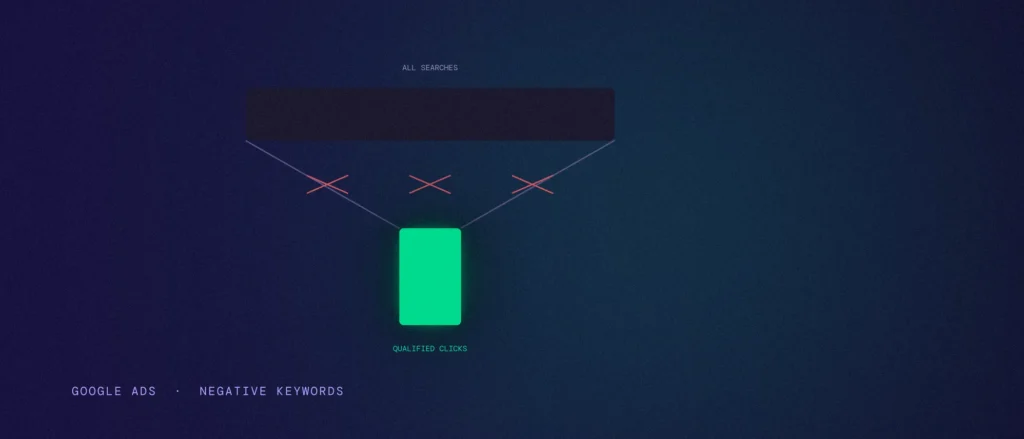
A negative keyword tells Google to hold your ad back from any search containing that term, the exact opposite of a regular keyword, which tells Google when to show your ad. Add “jobs” as a negative and your ad won’t show for “plumber jobs near me,” even if “plumber” is one of your regular keywords.
This matters most with broad and phrase match keywords, since those match types deliberately cast a wider net to catch variations and related searches. That flexibility is genuinely useful, but it also means your ad can show up for searches you never intended, unless negatives are actively pruning the obviously wrong ones out.
The predictable categories worth excluding before launch
You don’t need to guess at this from scratch. A handful of categories cause wasted spend for almost every business, regardless of industry:
- Job seekers: “jobs,” “careers,” “hiring,” “salary,” “vacancy”, searches from people looking for employment, not your service.
- Free and DIY seekers: “free,” “diy,” “template,” “how to do it yourself,” searches from people who were never going to pay for what you sell.
- Research-only intent: “what is,” “definition,” “meaning,” “examples,” searches from people gathering information, not ready to buy yet.
- Education, if you sell done-for-you services: “course,” “training,” “certification,” searches from people looking to learn the skill themselves, not hire it out.
Beyond that, think through words in your own keywords that have an unrelated second meaning. A “consultant” business might need to exclude “consultant jobs” or “become a consultant.” A “training” business might need to exclude “train times” or “train tickets” if “train” appears anywhere in a broad match keyword. This kind of overlap is specific to your own wording, so a generic list alone won’t catch it.
Negative match types work differently
Negative keywords have their own broad, phrase and exact match types, and they don’t behave the same way regular keyword match types do. A negative broad match blocks any search containing all the words you listed, in any order: adding “jobs careers” as a negative broad match blocks a search containing both words anywhere, which can overblock legitimate searches that happen to contain both.
A negative phrase match blocks searches containing your exact phrase in that order, even with other words added before or after it. A negative exact match blocks only that precise search, nothing else, “free trial” as a negative exact blocks only “free trial,” not “free trial software.” One easy mistake: when you add a negative straight from the search terms report, Google defaults it to exact match. Change it to phrase in most cases, or that specific block will barely apply beyond the one search you saw.
| Match type | What it blocks | Typical use |
|---|---|---|
| Negative broad | Any search containing all the listed words, in any order | A wide filter, use carefully since it can overblock |
| Negative phrase | Your exact phrase in order, even with extra words around it | The safe default for most exclusions |
| Negative exact | Only that one precise search, nothing else | Surgical blocks where you don’t want to overreach |
Account-level negatives, and where they apply
Google supports one account-level negative keyword list of up to 1,000 terms, which applies automatically across Search, Shopping, and, notably, Performance Max campaigns. This is where your predictable, universal exclusions belong, the jobs and free-seeker terms that apply no matter which specific campaign is running, so you’re not rebuilding the same list in every campaign you launch.
To set it up: in Google Ads, go to Admin, then Account settings, and find the Negative keywords section. Add your terms there, one per line, and they apply across every eligible campaign in the account without needing to be added again.
Performance Max negative keyword support has expanded significantly. Campaign-level negatives for PMax, once heavily restricted, now support up to 10,000 terms directly in the campaign settings, a real change from the much stricter limits PMax launched with. If you’re running PMax alongside Search, don’t assume it’s immune to irrelevant traffic just because it doesn’t use keywords the way Search does, it still benefits from negatives doing real work.
This is a starting point, not the finish line
A pre-launch negative list catches the predictable, universal waste. It won’t catch the specific, unexpected searches your actual keywords end up triggering, the ones you can only find by watching real search terms once the campaign is live. Checking the search terms report weekly for the first month, and regularly after that, is where the real, account-specific negative list gets built.
Treat the pre-launch list as insurance against the obvious mistakes, not a substitute for actually watching what happens once real searches start coming in.
What this looks like in practice
A Bengaluru interior design firm launching its first Search campaign around “interior designer bangalore” and similar broad match terms should exclude, before launch, terms like “jobs,” “internship,” “diy,” “free,” and “course,” since all of those attract searches from people who were never going to hire a designer. Without them, a chunk of the launch budget predictably goes to job seekers and DIY hobbyists in the first week.
A week into the live campaign, the search terms report might reveal something nobody could have predicted upfront, say, a surprising number of searches for “interior designer salary bangalore,” clearly job-related but not caught by a generic “jobs” negative since the word itself doesn’t appear. That’s the kind of specific gap only real search data reveals, which is why the pre-launch list is the start of the process, not the end of it.
Using AI to draft your starter list
The universal categories, jobs, free-seekers, research-only, are the same for almost everyone. The overlap risks specific to your own wording aren’t, and that’s exactly the kind of thing a structured prompt can help you spot before launch.
“Act as a Google Ads specialist helping me draft a starter negative keyword list before my first campaign goes live.
My campaign context:
– What I sell and to whom: [describe the service and ideal customer]
– The exact keywords I plan to bid on: [list them]
– Match types I’m using for each: [broad / phrase / exact, per keyword if it varies]
– Words in my keywords that might have an unrelated second meaning: [list any you’ve noticed, or “not sure, that’s why I’m asking”]Task:
1. Suggest a starter negative keyword list covering the universal categories, jobs, free/DIY, research-only, relevant to my specific service.
2. Look specifically at my exact keywords and flag any words with an unrelated second meaning I should exclude, explaining the risk for each.
3. Tell me which negative match type, broad, phrase or exact, makes sense for each suggested negative, not just the list itself.
4. Tell me which of these belong at the account level versus just this campaign.”
This is a reasoning aid, not a replacement for watching your real search terms report once the campaign is live. It can’t predict every search your specific keywords will trigger, only flag the risks visible from what you describe. Treat its list as your starting point, then keep building on it with real data.
Questions worth answering directly
Do I need negative keywords if I’m only using exact match?
Less urgently, but still worth having a starter list. Exact match today includes close variants, so even a tightly controlled campaign can pick up some unwanted searches. Broad and phrase match campaigns need negatives far more.
Does Performance Max support negative keywords?
Yes, and support has expanded significantly. Account-level negatives apply automatically to PMax, and campaign-level PMax negatives now support up to 10,000 terms directly in the campaign, a major increase from PMax’s original, much stricter limits.
What’s the difference between negative phrase and negative exact match?
Negative phrase blocks your exact phrase even with extra words added before or after it. Negative exact blocks only that precise search and nothing else. Phrase is broader and usually the safer default unless you specifically want surgical precision.
Should account-level or campaign-level negatives come first?
Put your universal, predictable exclusions, jobs, free-seekers, research-only terms, at the account level, since they apply everywhere without needing to be rebuilt per campaign. Save campaign-level negatives for exclusions specific to that particular campaign’s keywords and goals.
How often should I update my negative keyword list after launch?
Weekly for at least the first month, then regularly after that. The pre-launch list catches predictable waste, but the specific, unexpected search terms your actual keywords trigger only show up once real data starts coming in.
This pairs directly with choosing your match types, one decides which searches you are chasing, the other decides which ones to actively rule out. If you have not already, deciding between Search and Performance Max is usually the step before this one.
Where this actually pays off
A negative keyword list built before launch isn’t a guarantee against wasted spend, nothing is. It’s a cheap, predictable filter against the categories of waste every account without one eventually runs into, job seekers, freebie hunters, unrelated searches sharing a word with your keywords. Fifteen minutes of thinking through this before your first campaign goes live protects real budget in the first week, when you have the least data to know something’s gone wrong.
Launching a new Google Ads account, or wondering whether an existing one is quietly bleeding budget on irrelevant searches? Share your account and we’ll go through it properly, as part of every Google Ads management engagement we run.