Open any Google Ads account and you’ll see a number next to each keyword, from 1 to 10. That’s Quality Score. Some people treat it like a report card that decides whether their account is “good” or “bad.” Others ignore it completely and just watch their cost per click. Both are a bit wrong. Quality Score is real, it does affect what you pay, and it’s worth understanding properly instead of guessing.
Quick summary, if you’re short on time:
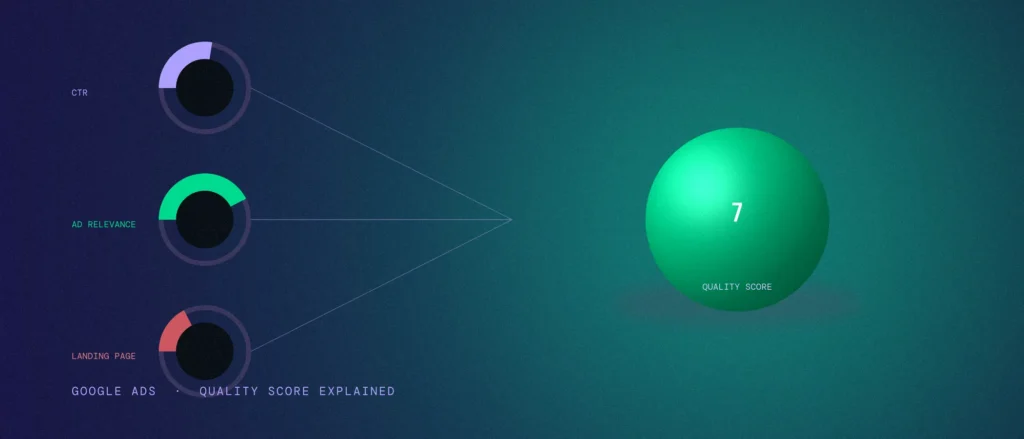
- Quality Score is a 1 to 10 rating Google gives each keyword, based on three things: expected click-through rate, ad relevance, and landing page experience.
- The visible 1-10 score itself isn’t plugged into the auction. The three signals behind it are, calculated fresh for every auction, and that’s how it ends up affecting what you pay.
- It’s a diagnostic tool, not a goal to chase for its own sake. Fix the three things behind it, and the score follows.
- You can see it for free right inside Google Ads, keyword by keyword.
Jump to a section:
- What Quality Score actually is
- The three things it’s built from
- Does it actually affect your cost per click?
- How to check your own score
- What to fix, based on which part is low
- What Quality Score is not
- Using AI to diagnose your own account
- Questions worth answering directly
What Quality Score actually is
Quality Score is Google’s way of rating how good a match your keyword, ad, and landing page are for the person searching. It’s shown as a whole number from 1 to 10, and you’ll find it sitting next to each keyword in your account once it has enough search volume to be measured.
Google built this because a bad ad experience costs Google too. If someone searches for something, clicks an ad, and lands on a page that doesn’t answer their question, that person is less likely to trust ads next time. Quality Score is Google’s way of rewarding advertisers who don’t waste the searcher’s time, and quietly penalising the ones who do.
The three things it’s built from
| Part | What it actually measures | What moves it |
|---|---|---|
| Expected click-through rate | How likely people are to click your ad when it’s shown for that keyword | Tighter keyword-to-ad match, clearer offer in the headline |
| Ad relevance | How closely your ad copy actually matches what the keyword means | Using the real keyword phrase in the headline and description, not a vague version of it |
| Landing page experience | Whether the page someone lands on actually delivers what the ad promised | A fast, relevant, easy-to-use page, not just any page on your site |
Each of these three gets its own rating, usually shown as “below average,” “average,” or “above average.” The 1 to 10 number you see is a rough summary of all three combined, not something you can improve directly. You improve the three parts. The score follows.
Does it actually affect your cost per click?
Yes, but the mechanism is a little more precise than most explanations make it sound. Google says directly that the visible 1 to 10 score itself isn’t used in the auction. What actually feeds the auction is real-time versions of the same three signals, expected click-through rate, ad relevance, and landing page experience, recalculated for that specific search, not pulled from the account-level number you see in your dashboard.
So think of the score you see as a summary report, not a lever Google pulls directly. But the underlying signals it’s summarising absolutely do affect the auction. Two advertisers can bid the exact same amount and pay very different prices, because the one with stronger underlying signals gets what amounts to a discount for being the better match. A low Quality Score is a visible symptom of weak signals that are already costing you money in the auction, even though the number itself isn’t the thing being multiplied into your bid.
The practical takeaway doesn’t change: fixing what’s behind a low score is one of the few genuinely free ways to lower your cost per click without touching your bids at all. Just don’t picture Google literally typing your “7” into a formula. It’s reading the real signals behind that 7, fresh, every time.
How to check your own score
Inside Google Ads, go to your Keywords view, and add the “Quality Score” column if it isn’t already showing. You’ll also want the three sub-columns: expected click-through rate, ad relevance, and landing page experience. That breakdown matters more than the single number, because it tells you exactly which of the three to fix.
New keywords, or ones with very little search volume, often show “not yet assigned” instead of a score. That’s expected. Google needs enough data to judge the match properly before it rates it.
What to fix, based on which part is low
- Low expected click-through rate. This usually means your ad isn’t standing out or isn’t clearly answering the search. Rewrite the headline to speak directly to that keyword, not a general version of your business.
- Low ad relevance. This is almost always a structure problem: too many unrelated keywords crammed into one ad group. Split them into tighter groups, each with its own ad that uses the actual keyword phrase.
- Low landing page experience. Check whether the page loads quickly, whether it’s clearly related to the keyword, and whether a visitor can immediately tell they’re in the right place. Sending every keyword to your homepage is a common cause of this.
If more than one part is low at once, fix ad relevance first. A tighter, more specific ad group usually pulls the other two up along with it, since a better-matched ad naturally gets a better click-through rate and points to a more relevant page.
What Quality Score is not
- It’s not a guarantee of a top position. Bid and competition still matter. A perfect score with a low bid can still lose to a lower score with a much higher bid.
- It’s not something you can raise directly. There’s no setting called “increase Quality Score.” You improve the ad, the keyword match, and the landing page, and the score reflects that.
- It’s not the same across every keyword. Each keyword in your account has its own score. A 9 on one keyword and a 3 on another in the same campaign is normal, not a bug.
- A low score doesn’t mean stop advertising. It means something specific is mismatched. Find which of the three parts is weak, and fix that one thing.
- It’s not a KPI to report to a client or a boss. Conversion rate, cost per lead, and actual revenue are what prove an account is working. Quality Score tells you what to test next, not whether the account is succeeding.
A local example
A Bengaluru dentist running ads for “emergency dentist near me” might see “Below average” on both ad relevance and landing page experience. The ad copy talks generally about the clinic. The landing page is the homepage, not a page about emergencies. Rewriting the ad to explicitly mention same-day emergency slots, and sending that click to a page that matches, walk-in availability, what to expect, a clear call button, usually moves both signals at once. The Quality Score number goes up as a side effect. The real result is a better-matched ad reaching people who were already searching with real urgency.
Using AI to diagnose your own account
Once you have your three sub-scores in front of you, in Google Ads under the Keywords view, deciding which one to fix first and how is exactly the kind of structured reasoning a prompt handles well, especially if more than one part is showing weak at once.
“Act as a Google Ads specialist helping me fix a low Quality Score on a specific keyword.
Keyword and account context:
– The keyword: [your keyword]
– Expected click-through rate rating: [below average / average / above average]
– Ad relevance rating: [below average / average / above average]
– Landing page experience rating: [below average / above average / above average]
– What my current ad headline and description actually say: [paste them]
– What page this keyword currently sends clicks to, and what’s on it: [describe the landing page]
– How many other, unrelated keywords share this same ad group: [number, roughly]Task:
1. Based on my three ratings, tell me which single part is most likely dragging the others down, not just list all three as equally important.
2. Rewrite my ad headline and description to more tightly match this specific keyword, using my actual keyword text.
3. Tell me plainly whether my landing page is a good match for this keyword’s intent, and what’s missing if it isn’t.
4. If too many unrelated keywords share this ad group, tell me how you’d split it and why.”
This is a reasoning aid, not a replacement for actually looking at your account. It can’t see your real Quality Score breakdown or your actual ad and landing page, only what you paste in. The more honestly you describe the current state, the more useful the recommendation.
Questions worth answering directly
Is a Quality Score of 10 always the goal?
Not necessarily. A 7 or 8 with a well-matched, converting keyword is often good enough. Chasing a perfect 10 across every keyword usually isn’t worth the time compared to fixing the keywords that are actually costing you money.
Can Quality Score change over time?
Yes. It’s recalculated regularly based on recent performance, so a change to your ad copy or landing page can shift it within days, not months.
Does Quality Score apply to Performance Max campaigns?
Not in the same visible, keyword-by-keyword way. Performance Max doesn’t use keywords the same way Search does, so this specific metric is really a Search campaign concept.
Why does a new keyword show no Quality Score?
Google needs enough search volume and click data on that exact keyword before it can rate the match confidently. Give it time and real traffic before assuming something’s wrong.
Is it worth paying more to compensate for a low Quality Score?
Sometimes, short term, but it’s treating the symptom, not the cause. Fixing the ad relevance or landing page usually costs nothing and lowers your cost per click for good, instead of just outbidding the problem.
Ad relevance, one of the three things behind Quality Score, ties directly into our guide to match types, since a tighter match type usually means a tighter, more relevant ad.
Quality Score is one of the first things we check on any Google Ads account we take over, precisely because it’s a free lever most businesses never pull. If you’re also still deciding between Search and Performance Max, this is one more reason Search tends to come first: you can actually see and fix these signals, keyword by keyword, in a way Performance Max doesn’t expose. Working through this the right way, tight ad groups, matched copy, relevant landing pages, is standard practice inside every Google Ads management engagement we run.