Knowing how to respond to Google reviews is one of the few parts of Google Business Profile that is entirely in your hands. Every online review, good or bad, gets a public review response from you, and that response is part of the customer experience. A good reply takes two minutes, is read by every future customer who opens the review, and tells them how you treat people when something goes wrong. A bad one, or none at all, says the opposite.
This post explains how to reply to Google reviews, what Google’s own guidelines say, and gives 20 reply templates you can adapt: for 5-star, 4-star, 3-star, 1 and 2-star reviews, no-text ratings and fake reviews. We re-read Google’s Business Profile help pages and its Maps content policy on 10 October 2026, and every Google statement below comes from them. Where something is our own advice, we say so. For the ranking side of negative reviews, see our post on responding to negative Google reviews without hurting your rankings.
Quick summary, if you’re short on time:
- You must verify your business before you can reply. Google reviews your replies before they are posted, and they usually take up to 10 minutes but can take up to 30 days.
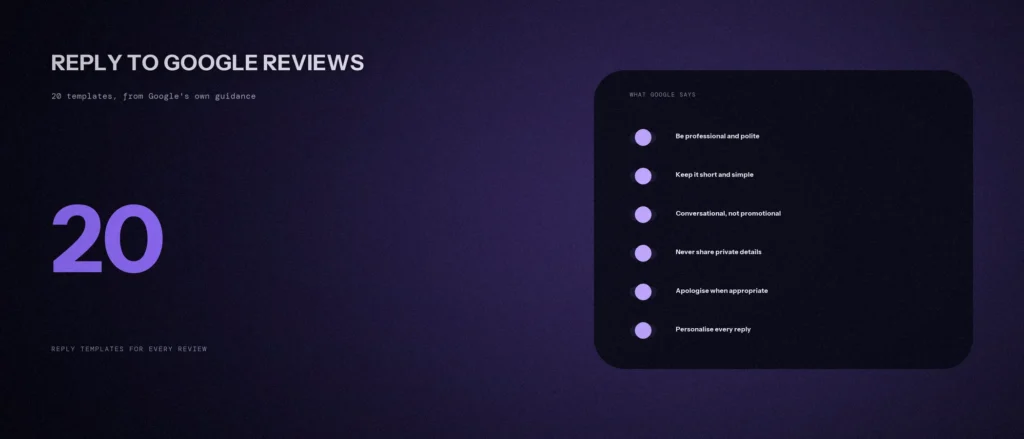
- Google’s tips for replies: be professional and polite, keep it short and simple, and be conversational, not promotional.
- Instead of the same “thank you” to everyone, Google says to focus on replies that share a helpful update or answer a question.
- For negative reviews, never share a reviewer’s private information or make personal attacks. If the matter is complex, ask the reviewer to contact you by phone or email.
- Report a review only if it breaks Google’s policies. Google says not to report a review just because you disagree with it.
Jump to a section:
- What Google says about replies
- Before you reply: five rules
- Templates 1 to 5: 5-star reviews
- Templates 6 to 11: 4-star and 3-star reviews
- Templates 12 to 16: 1 and 2-star reviews
- Templates 17 to 20: fake, spam and no-text reviews
- How to report a review that breaks the rules
- Mistakes that make replies worse
- A prompt to draft a reply to a real review
- Questions about replying to Google reviews
What Google says about replies
Google’s help page on managing customer reviews sets out how replies work:
- Verify first. Before you can reply to reviews, you must verify your business.
- Replies are reviewed. Google checks that your reply follows its content policies. If it is not approved, you will be asked to edit it. Google says replies usually take up to 10 minutes to review, but sometimes up to 30 days.
- Replies are public. An approved reply is posted under the customer’s review and appears as if your business replied. Your personal name is not shown.
- The customer is told. The reviewer is notified when you reply, and Google says customers can still change their review after reading it.
- You can edit or delete your reply later from Read reviews in your profile.
Google’s page of tips says to respond to reviews as a best practice, and that helpful and positive replies can show that you are responsive, and that replying shows customers their feedback matters. It also says honest and balanced reviews help people decide, and that a mix of positive and negative feedback often feels more trustworthy.
Before you reply: five rules
A quick note on SEO. We are not claiming that replying changes your star rating or lifts your rankings. Google’s pages say that replies show customers you value their feedback and that positive reviews and helpful replies can help your business stand out. That is the claim we make too.
- Be professional and polite. Google says replies must follow its content policies, like reviews do.
- Keep it short and simple. Google’s tip is that if a reply is too long, people might stop reading before they reach the main point.
- Don’t sell in a reply. Google says to be conversational, not promotional, and to avoid using your response to offer deals or promotions.
- Protect privacy. Google says to never share a reviewer’s private information. Our own addition for clinics and similar services: avoid confirming that the person was a patient or client, because the reply is public. This is our judgment, not a Google rule.
- Personalise it. Google says to address the reviewer by name, acknowledge their specific feedback, and sign off with your name or initials.
Google also says not to send the same thank you to everyone. A copied template is a starting point. Change at least one detail in every reply so it is clearly about that person.
Templates 1 to 5: 5-star reviews
Google suggests focusing on reviews where you can share a helpful update or answer a question. For a plain 5-star, keep it warm and brief. Replace the text in [brackets].
- Short and warm. “Thank you, [name]. We’re glad [specific thing they mentioned] worked out well. See you again. [Your name]”
- Naming a detail. “Hi [name], thank you for the kind words about [the thing they mentioned]. It means a lot to the whole team. [Your name]”
- Repeat customer. “Thank you, [name], and thank you for coming back. It’s good to know [what they said] still holds up. [Your name]”
- Praise for a person. “Thank you, [name]. We’ve passed your note on to [staff name], and it made their day. [Your name]”
- Helpful follow-up. “Thank you, [name]. One tip since you mentioned [topic]: [one useful, true detail]. Happy to help if you have questions. [Your name]”
Templates 6 to 11: 4-star and 3-star reviews
A 4-star or 3-star review is often the most useful one. The customer is mostly fair, and a good reply can show other readers how you handle a small problem.
- 4-star, no complaint. “Thank you, [name], for the 4 stars and the kind words. If there’s one thing we could do better, we’d like to hear it. [Your name]”
- 4-star with a small point. “Thanks, [name]. You mentioned [point], and that’s fair. We’re [what you will actually do]. [Your name]”
- 3-star, mixed. “Hi [name], thank you for being honest. We’re glad [the good part], and sorry about [the issue]. [What you did or will do]. You’re welcome to contact us at [phone or email] so we can look into it. [Your name]”
- 3-star, no explanation. “Hi [name], thank you for the rating. We’d like to know what we could have done better. Please call us on [number] or write to [email]. [Your name]”
- 3-star, outside your control. “Hi [name], thank you. We understand the wait was longer than you wanted. [Honest one-line reason and what you can and cannot do]. We appreciate your patience. [Your name]”
- 3-star, a fair point you have fixed. “Hi [name], thank you. You were right about [point]. We’ve since [specific change]. We’d be glad to have you back. [Your name]”
Templates 12 to 16: 1 and 2-star reviews
Google says negative reviews are not necessarily a sign of poor business practice, but a chance to understand customer expectations, and that constructive replies and follow-up can show that you care and may even encourage the customer to update their review. Its tips: acknowledge mistakes but don’t take responsibility for things outside your control, explain what you can and cannot do, apologise when appropriate, and move complex matters to a private conversation.
- Genuine mistake. “Hi [name], we’re sorry. [What went wrong, in one sentence] should not have happened, and we apologise. We’ve [what you changed]. Please call us on [number] so we can put this right. [Your name]”
- Service problem, private follow-up. “Hi [name], we’re sorry to read this, and we’d like to understand what happened. Could you call [number] or email [email]? We’ll look into it the same day. [Your name]”
- Something outside your control. “Hi [name], we’re sorry the [delay or cancellation] affected your plans. [One honest line about the cause]. We [what you do in such cases]. We hope to do better next time. [Your name]”
- You disagree on the facts. “Hi [name], thank you for the feedback. Our records show [neutral fact, no blame], and we’d like to check it with you. Please contact us on [number] so we can look into it properly. [Your name]”
- Price or expectation. “Hi [name], thank you for telling us. We’re sorry the [price or result] didn’t match what you expected. We explain [what you do at the start], and we’ll make sure it’s clearer. Please contact us at [email]. [Your name]”
Never argue in the reply, never name the person’s details, and never insult them. Write for the next stranger who reads it, not only the reviewer.
Templates 17 to 20: fake, spam and no-text reviews
- A rating with no text. “Hi [name], thank you for the rating. If there is anything we can do better, we’d like to hear it. [Phone or email]. [Your name]”
- A review you cannot match to a customer. “Hi, we can’t find a record of your visit under this name. Could you contact us at [email] with the details so we can look into it? [Your name]”. Use this only after you have checked, and do not accuse the person.
- Spam or an offer from another business. No reply is needed. Report it instead, using the steps below.
- A competitor or obvious fake. Report first. If it stays up, post one calm line: “We can’t find any record of this experience. If you are a customer, please contact us at [email]. [Your name]”. Don’t get into a back-and-forth.
How to report a review that breaks the rules
Google says you can report any review, but only those that violate its policies are eligible for removal. It also says not to report a review just because you disagree with it or dislike it, and that Google doesn’t get involved in conflict between businesses and customers.
- Go to your Business Profile and select Read reviews.
- Next to the review, select Report.
- Choose the reason, for example spam or profanity, and select Send report.
- Check the status in the Reviews Management Tool. Google says evaluation typically takes several days.
The possible statuses include “decision pending” and “report reviewed, no policy violation”. If you disagree with a decision, Google says you can submit a one-time appeal.
What counts as a violation comes from Google’s Maps content policy. It lists fake engagement, including content not based on a real experience, reviews that have been paid for, and content posted from multiple accounts by one person. It also lists reviews offering incentives such as payment, discounts or free goods in exchange for posting a review, or for changing or removing a negative one. That last point applies to you as well: do not offer a customer a discount to change their review.
Mistakes that make replies worse
- The same reply to everyone. Google says to focus on replies that share a helpful update or answer a question.
- Arguing. A public fight is read by every future customer, and a calm answer reads better than being right.
- Sharing private details. Google says never to share a reviewer’s private information.
- Offering a deal in the reply. Google says to avoid offering deals or promotions in a response.
- Waiting too long. Google’s tip is to respond in a timely manner. A prompt response shows that you value feedback.
- Replying only to the bad ones. A reply to a positive review is a chance to show your service to someone reading before they choose.
A prompt to draft a reply to a real review
An AI tool can write a first draft of a reply quickly. It does not know what really happened, so give it the facts, and read the result carefully before you post anything.
Act as a careful customer service writer for a small local business. Draft a reply to one Google review.
My details:
– What my business does: [one line]
– The review, pasted exactly (name, stars and text): [paste]
– What actually happened, from my records: [facts only, or say not sure]
– What I am willing to do about it: [for example call back, refund, fix it, or nothing]
– How I sign off, and the best phone or email for follow-up: [details]Please do the following:
1. Write a reply of 60 words or fewer in a warm, professional voice.
2. Address the reviewer by name and refer to one specific thing they said.
3. If the review is negative, apologise only for what my facts support, and move the details to a phone or email conversation.
4. After the reply, list anything in my facts that I should check before posting.Rules:
– Use only the facts I gave you. Do not invent what happened, offers or refunds.
– Do not share the reviewer’s private details, and do not confirm whether they were a customer or patient unless I say so.
– Do not offer a discount or promotion.
– Write in plain, simple English.
Change at least one line so it sounds like you, and post it yourself from your Business Profile.
Questions about replying to Google reviews
How do I reply to a Google review?
Verify your business first. Then go to your Business Profile, select Read reviews, choose Reply next to the review, write your reply and select Reply. Google reviews it before it is posted.
How do I respond to a 3-star review?
Thank the person for being honest, say what was good and what was not, say what you will do, and offer to talk privately. Keep it short and do not argue. Templates 8 to 11 in this post cover common cases.
Should I reply to every Google review?
Google says that, as a best practice, you should reply to reviews and share your perspective. It also says not to send the same thank you to everyone, so put your effort where you can answer a question or add something useful.
Can I delete a negative Google review?
Only Google can remove a review, and only if it breaks its policies. You can report it, and Google says not to report a review just because you disagree with it. Otherwise, reply politely and show how you handled it.
How long does a review reply take to appear?
Google says replies usually take up to 10 minutes to review, but sometimes can take up to 30 days. If your reply isn’t approved, you will be asked to edit it.
Can I offer a discount to get a bad review changed?
No. Google’s content policy prohibits offering incentives such as payment, discounts or free goods in exchange for a review or for changing or removing a negative review. Resolve the issue honestly and let the customer decide.
Where this matters
Every reply is public, and the people who matter most are the strangers reading it before they choose you. Reply promptly, keep it short, stay calm, and use the templates as a starting point and not a script.
If you would like help building a steady flow of honest reviews, send us your business name and area and we will tell you what we see.