Google has been calling, texting, and WhatsApp-messaging businesses for years to confirm details like hours and curbside pickup, then quietly updating the public profile based on the answer. Most owners never saw what was actually collected or had any way to check it. That just changed.
Google Business Profile now has a dashboard tab that shows exactly what its automated assistant gathered about your business, and lets you delete anything wrong with one click.
Quick summary, if you’re short on time:
- The new “Collected Info” tab shows what Google’s automated calls, texts, and WhatsApp conversations gathered about your business, with the source and date attached.
- You can delete any individual piece of collected info directly from the dashboard.
- Deleting an entry removes Google’s record of it, but doesn’t automatically undo a change that record may have already triggered on your live profile.
- The feature is US-only so far, and not in every state, Indiana, Louisiana, Minnesota, Montana and Nebraska are currently excluded.
- This closes a real visibility gap: businesses could be updated by an automated call they never actually confirmed accurately, with no way to check what was said.
Jump to a section:
- What the Collected Info tab actually shows
- Why this matters more than it sounds like it should
- The catch worth knowing about deletion
- What to actually do with this
- A prompt to review your Google Business Profile information
- Questions worth answering directly
What the Collected Info tab actually shows
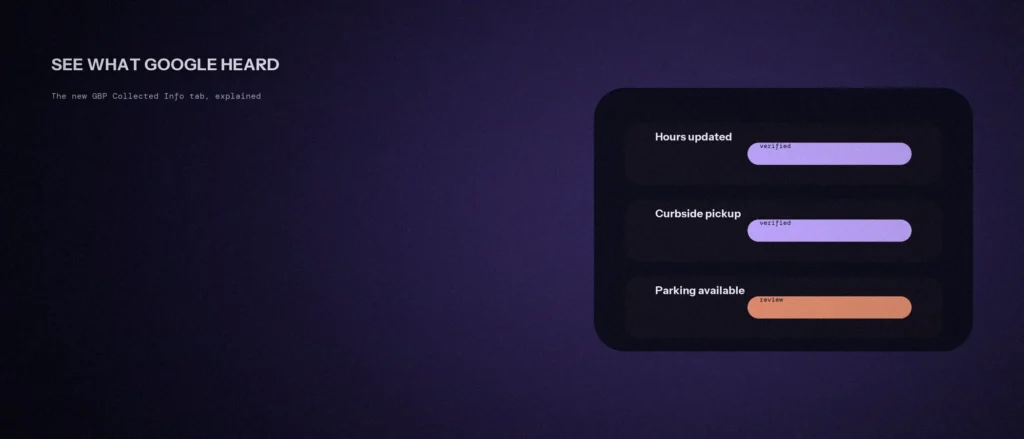
Search Engine Land reported the official rollout on September 14, 2026, of a new tab inside the Business Profile dashboard specifically for this. Google’s own description is direct: “this info was collected in phone or chat conversations with your business,” referring to the automated calls, texts, and WhatsApp messages Google has long used to confirm attributes like operating hours, curbside pickup, and parking.
Each entry in the tab shows where the information came from and when it was collected, and a delete option sits right next to it. Before this, that entire process happened out of view, an automated call would confirm something, and whatever got recorded could quietly shape the public listing with no record an owner could actually check.
Why this matters more than it sounds like it should
Automated confirmation calls aren’t rare, and they aren’t always accurate. A rushed answer, a bad connection, or a staff member confirming something they weren’t actually sure about can all end up baked into a profile people are checking before they call or visit. Without visibility into what was actually recorded, there was no way to catch that until a customer showed up expecting something the business never actually confirmed.
This connects directly to the same accuracy problem covered in our post on GBP signals that move the local pack: Google is increasingly comfortable filling in details on a business’s behalf, and the businesses that do best are the ones actively checking what’s actually live, not assuming it’s correct because they never touched it.
The catch worth knowing about deletion
Deleting an entry from the Collected Info tab removes it from Google’s stored record of that conversation. It does not automatically reverse a change that entry already caused on the live profile. If an automated call already updated your listed hours, deleting the record of that call afterward doesn’t put the old hours back, the actual fix still has to happen through the normal profile editing screen.
Treat the tab as a review and correction log, not an undo button. The real value is catching bad information before it spreads further, and having a clear record of what Google collected and from where, not a one-click revert for changes already live.
What to actually do with this
Check the tab now, even if nothing about your listing looks obviously wrong. Compare what Google says it collected against what you know to be true, hours, service availability, any attribute that could have come from a call your team doesn’t specifically remember confirming carefully.
Make this a recurring check, not a one-time cleanup. Automated calls don’t stop after the first one, so a listing that’s accurate today can still drift after the next call your business doesn’t fully control. Getting the primary category and core attributes right in the first place, covered in choosing the right GBP category, gives Google’s automated systems a more accurate baseline to confirm against to begin with.
A prompt to review your Google Business Profile information
The Collected Info tab shows details Google gathered about your business. The prompt below helps you check that everything is right and consistent. Fill in your details, then compare them with your live profile.
Act as a local SEO assistant. Help me review my Google Business Profile details.
My real business details:
– Name: [name]
– Address or service area: [details]
– Phone and website: [details]
– Hours: [details]
– Services and categories: [list]
– What the Collected Info tab shows that I did not enter: [list, or say none]Please do the following:
1. Make a checklist of the fields I should compare against my real details.
2. Tell me which differences matter most.
3. Give me a short list of anything in the tab that I should confirm or correct.Rules:
– Do not invent fields or menu names. If you are unsure, tell me to check the live profile.
– Do not suggest adding false information.
– Keep it short.
Open the profile and compare each field by hand. Correct anything wrong straight away, since Google may show it to customers.
Questions worth answering directly
What is the Google Business Profile Collected Info tab?
A dashboard section that shows details Google’s automated assistant gathered about your business through phone calls, texts, or WhatsApp conversations, including the source and date, with the option to delete individual entries.
Does deleting collected info undo changes already made to my profile?
No. Deleting an entry removes Google’s record of that conversation but doesn’t automatically reverse a change it already caused on your live listing. Any incorrect detail already published still needs to be corrected directly through your profile’s normal edit screen.
Is the Collected Info tab available everywhere?
Not yet. As of the September 2026 rollout, it’s available in the US only, and not in every state, Indiana, Louisiana, Minnesota, Montana and Nebraska are currently excluded.
Why does the Collected Info tab matter?
Automated confirmation calls are not always accurate. A rushed answer, a bad connection or a staff member unsure of the facts can all end up in a profile people check before they call or visit. Until now, owners had no way to see what was recorded.
What information does Google collect through these calls?
Attributes such as operating hours, curbside pickup and parking, gathered through automated calls, texts and WhatsApp messages. Each entry in the tab shows where the information came from and when it was collected.
How often should I check the Collected Info tab?
Regularly, not once. Automated calls do not stop after the first one, so a listing that is accurate today can drift after the next call your business does not fully control.
Where this actually matters
A Google Business Profile can drift away from accurate without anyone touching it directly, one automated call at a time. This tab is the first real window into that process, and checking it is now a genuine, low-effort way to catch a mistake before a customer does.
Not sure what Google’s automated systems may have already changed on your own listing? We check this as part of every local SEO engagement we run.