Open ten competing Google Business Profiles in your area and you’ll usually spot the same pattern. A couple have a handful of blurry, years-old photos. One or two have nothing but a logo. And one, usually the one getting the calls, has dozens of real, recent photos that make the place look like somewhere you’d actually want to walk into. Photos aren’t decoration on a Google profile. They’re doing real work.
Quick summary, if you’re short on time:
- Google has never published an official minimum or ideal photo count. There’s no magic number to hit.
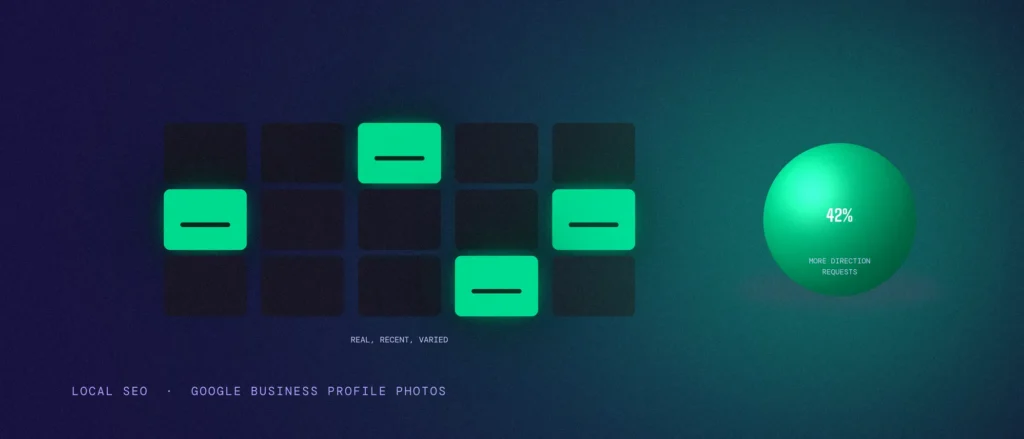
- Google itself has reported that businesses with photos get 42% more requests for directions and 35% more clicks through to their website than businesses without any.
- What matters more than the count is coverage: exterior, interior, team, work in progress, and finished results, not twenty versions of the same shot.
- Stale photos hurt you. A profile with 40 photos from three years ago says less about your business today than 10 photos from last month.
- Google’s own guidance covers format and quality, not quantity: focused, well lit, no heavy filters or AI edits, real resolution, not a marketing graphic.
Jump to a section:
- Why there’s no magic number
- The one stat Google has actually shared
- What your photos should actually cover
- Google’s real rules: quality, not quantity
- Why old photos quietly work against you
- What this looks like in practice
- Questions worth answering directly
Why there’s no magic number
People ask this question expecting a clean answer, 15 photos, 20 photos, something specific. Google has never given one. There’s no official rule saying a profile needs a set number of photos to rank well or to be considered “complete.”
That’s not Google being vague for no reason. A one-person tutoring business and a 40-table restaurant don’t need the same number of photos to properly represent themselves. Chasing a specific count misses the actual point, which is showing enough of the real business that a stranger can trust what they’re about to walk into.
You’ll sometimes see it claimed that top-ranking profiles simply have more photos than everyone else, as if there’s a hidden threshold. There’s a simpler explanation that fits the pattern better: businesses that bother to keep their photos current and varied usually also keep their hours accurate, their categories right, and their reviews answered. The photos aren’t the cause. They’re a sign of a profile someone is actually maintaining.
The one stat Google has actually shared
Here’s the number that’s actually worth knowing, and it’s not about how many photos to add, it’s about having photos at all. Google has reported that businesses with photos on their profile get 42% more requests for directions and 35% more clicks through to their website, compared with businesses that have none.
That gap is the real cost of an empty or logo-only profile. It’s not a ranking penalty in the technical sense. It’s simpler than that: a profile with no real photos gives a searcher no reason to pick you over the next result that actually shows them something.
What your photos should actually cover
Instead of chasing a number, aim for coverage. A profile that properly represents a business usually includes a handful of categories, not one type of photo repeated a dozen times.
- Exterior and entrance, so someone can recognise the place when they arrive.
- Interior or workspace, especially for anything customer-facing, so people know what to expect.
- The team, at least a few real people, since faces build trust faster than almost anything else on a profile.
- The actual work or product, not a stock photo of something similar.
- A finished result, where it makes sense, a completed job, a served dish, a delivered project, something that shows the outcome, not just the process.
As a rough anchor, not a rule: a small operation like a two-chair salon or a single consultant usually covers all of this properly with somewhere around ten to twenty well-chosen, current photos. A multi-location business with several teams and vehicles will genuinely need more, simply because there’s more real ground to cover, not because a bigger number ranks better on its own.
Google’s real rules: quality, not quantity
Google’s actual published guidance is about quality, not count. Photos should be in focus and well lit, with no significant alterations or heavy filters, and no AI-generated edits, since the whole point is representing the real business. Per Google’s own recommendation, that’s a resolution of 720 by 720 pixels, with a minimum of 250 by 250, in JPG or PNG format, between 10KB and 5MB in size.
This rules out a few common mistakes without you needing to guess: a low-resolution photo pulled from an old phone, a heavily filtered shot that makes a space look nothing like it does in person, or a purely graphic image, like a poster or a text-heavy flyer, standing in for a real photo.
Why old photos quietly work against you
A profile can technically “have enough photos” and still be doing damage, if all of them are old. A renovated interior that photos still show in its previous layout. A team photo with three people who no longer work there. A menu or product range that’s since changed. None of this is against any rule, but it quietly misleads the exact person you’re trying to earn trust with.
Treat your GBP photos the way you’d treat a shop window, something you’d actually walk past and update, not a folder you filled once during setup and never opened again. A short quarterly pass, swap out anything outdated, add a few recent ones, does more for trust than chasing any specific count ever will.
What this looks like in practice
Take a Bengaluru salon with a Google Business Profile that’s technically “full,” 30-plus photos, but almost all of them are the same few interior shots taken on opening day, two years ago. No stylists shown, no recent haircuts or colour work, nothing dated within the last six months.
A searcher comparing salons nearby has no way to tell if this one is even still doing the styles shown in the photos, or whether the team pictured is still there. A smaller, better-curated profile, ten recent photos covering the space, three or four stylists, a handful of actual finished haircuts and colour jobs from the last month, tells a far more convincing story with a third of the photo count.
Questions worth answering directly
Is there a minimum number of photos Google requires?
No. Google has never published a required minimum. What matters is having enough real, current photos to represent the business honestly, not hitting a specific count.
Can I upload too many photos?
There’s no official cap that hurts you, but repeating near-identical shots doesn’t add value either. Ten photos that show real coverage of your business beat thirty that show the same three things.
Do customer photos count, or only ones I upload?
Both appear on your profile, and customer-uploaded photos are genuinely useful since they read as unprompted and authentic. You can’t control when customers add them, but you can make it easy by asking happy customers to add a photo along with a review.
Does Google penalise stock photos or graphics?
Google’s guidance asks for photos that represent reality, so a stock image or a text-heavy graphic standing in for a real photo works against you, even if it isn’t technically banned. Stick to real photos of your actual business.
How often should I add new photos?
There’s no fixed schedule, but a quarterly check-in is a reasonable habit: remove anything outdated, add a few recent shots, and make sure the team and space shown still match reality.
Photos are one signal among several. See our post on GBP signals that move the local pack for the full picture, and make sure your primary category is right too.
Where this actually pays off
Photos are one of the few parts of a Google Business Profile that cost nothing but a few minutes and a phone camera, and they’re one of the first things a searcher actually looks at before ever reading your reviews. Getting this right isn’t about hitting a number. It’s about making sure anyone comparing you against three other options can actually picture walking in.
Not sure whether your Google Business Profile photos are helping or quietly working against you? Share your listing and we’ll go through what’s there, what’s missing, and what’s overdue for an update, as part of every local SEO engagement we run, including our Bangalore local SEO service if that is your market.